

Table of Contents
- 1. Why this matters
- 2. What is an agent?
- 3. Multi-agent patterns
- 4. Skills + subagents (SDK-level terminology)
- 5. Tool / function calling design
- 6. Tool error handling
- 7. Frameworks: LangGraph vs CrewAI vs AutoGen vs OpenAI Agents SDK
- 8. Worked example: a planner-executor multi-agent workflow
- 9. Agent evaluation
- 10. Common interview questions
- 11. Wrapping up
- 12. Sources
Last update: July 2026. All opinions are my own.
Generative AI Engineering · Part 6/8
This is the topic the the modern GenAI JD names most explicitly: multi-agent orchestration, tool / function calling, and the framework landscape. If they only dig into one thing on the technical loop, it will be this. Every section below is written assuming the interviewer will follow up with "and how would you build that?"
Why this matters
If you read a modern Generative AI Engineer job description carefully, one sentence stands out: they want someone who has shipped multi-agent systems with tool calling, not just fine-tuned a prompt. That is a very specific claim, and it maps to a very specific body of knowledge — patterns (orchestrator, hierarchical, network, sequential, debate), tool schema design, error handling, and the trade-offs between LangGraph, CrewAI, AutoGen, and the OpenAI Agents SDK.
You are going to walk out of this post able to:
- Define what an "agent" actually is (spoiler: LLM + tools + planner + memory + a loop).
- Sketch each multi-agent pattern on a whiteboard, with when-to-use notes.
- Write a tool schema that Claude or GPT will actually call reliably.
- Add retries, timeouts, fallbacks, and a circuit breaker to that tool.
- Compare LangGraph, CrewAI, AutoGen, and the OpenAI Agents SDK by trade-off.
- Answer the 8–10 interview questions at the end without pausing.
The two adjacent posts you want to keep in the same tab are Part 6 — Prompting & Reasoning Loops (because agents are just prompting with a loop) and Part 10 — Guardrails & Safety (because the moment you give an LLM tools, you have to defend against prompt injection).
What is an agent?


Anthropic's "Building effective agents" post makes a distinction that is worth memorising, because interviewers use it:
- A workflow is an LLM + tools orchestrated through predefined code paths. Deterministic control flow, LLM inside individual steps.
- An agent is an LLM that dynamically decides its own control flow — which tool to call next, whether to stop, when to hand off.
Both are valuable. A workflow is easier to test and cheaper to run. An agent is more flexible but harder to evaluate. The interview trap is treating "agent" as the answer to every problem — the correct answer is "workflow first, agent only when the problem needs dynamic control flow."
An agent, minimally, is four things:
- An LLM — the reasoning core.
- Tools — callable functions the LLM can decide to invoke.
- A planner — usually a prompt (system message + ReAct-style scaffolding) that tells the LLM how to decompose the task.
- Memory — short-term (conversation state) and long-term (vector store, database, file system).
Wrap all of that in a loop that keeps calling the LLM until it says "I'm done" (or a step budget runs out), and you have an agent.

The simplest possible agent is under 30 lines of Python:
def run_agent(user_message, tools, max_steps=10):
    messages = [{"role": "user", "content": user_message}]
    for step in range(max_steps):
        response = llm.chat(messages, tools=tools)
        messages.append({"role": "assistant", "content": response.content})

        if response.stop_reason == "end_turn":
            return response.content  # agent decided it's done

        # otherwise the model called a tool
        for tool_call in response.tool_calls:
            result = execute_tool(tool_call.name, tool_call.arguments)
            messages.append({
                "role": "tool",
                "tool_call_id": tool_call.id,
                "content": str(result),
            })
    raise RuntimeError("Agent hit max_steps without finishing")
Everything else in this post — CrewAI, LangGraph, AutoGen — is a fancier version of that loop.
Multi-agent patterns


Here is the pattern zoo. Interviewers love these because they map cleanly to problems you actually see in production.
1. Single-agent (one LLM, many tools)
One agent, a big toolbox. The LLM decides which tool to call, in which order. Simplest thing that could work.
Use when: the domain is narrow and one system prompt can cover the whole role — customer support triage, a personal calendar assistant, a coding sidekick with search + edit + run.
Don't use when: you have specialists that need conflicting system prompts (a "security auditor" role and a "marketing copywriter" role should almost never share a system prompt).
2. Orchestrator / supervisor pattern
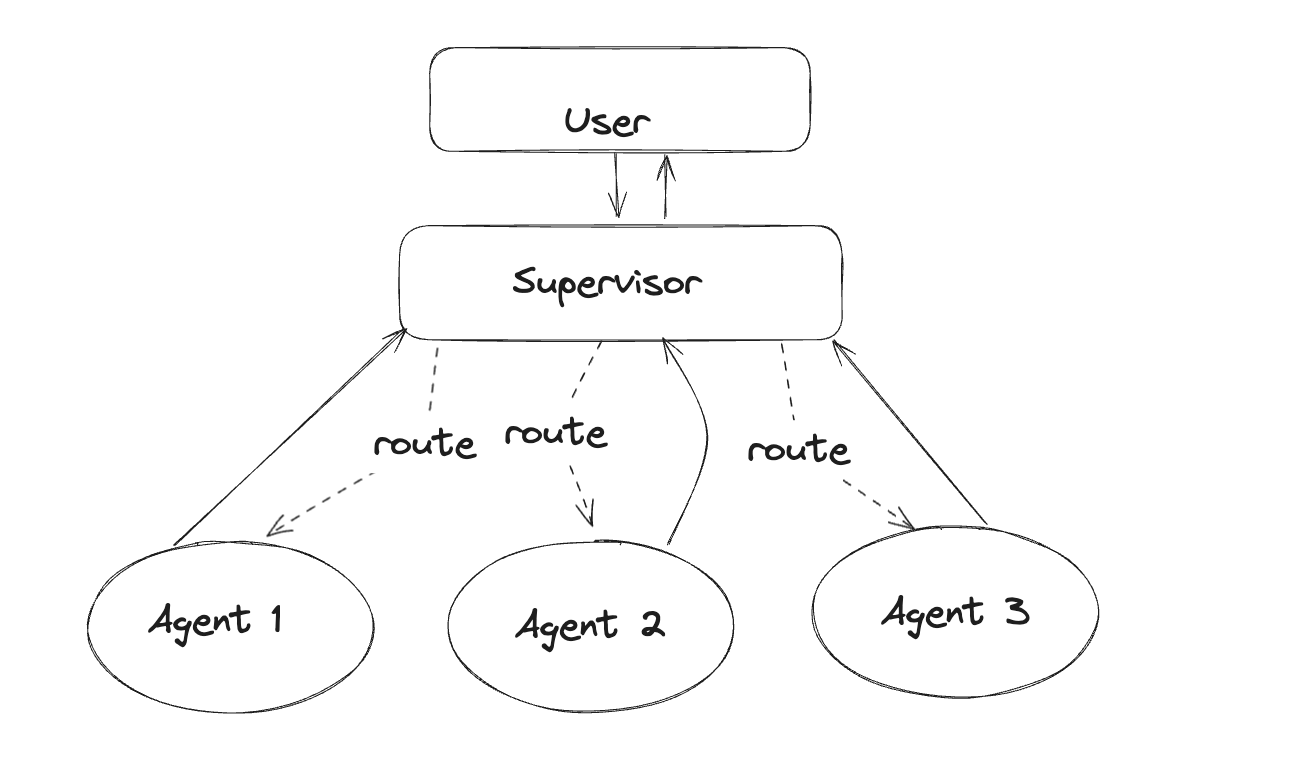
One "supervisor" LLM sits at the top, receives the user request, and routes to specialised worker agents (a "research agent", a "code agent", a "writing agent"). Each worker returns its result to the supervisor, which synthesises the final response.
This is the most widely deployed multi-agent pattern in production LangGraph systems. Klarna, Replit and Elastic all use variants of it.
Use when: you have distinct specialist roles and one coordinator that decides who does what. Customer service is the canonical example (billing agent, technical agent, refund agent, all under a triage supervisor).
Trade-off: the supervisor is a single point of failure and a latency bottleneck. Every step goes through it.
3. Hierarchical (agents that spawn sub-agents)
The supervisor pattern, recursed. A "manager" agent can spawn a "team" of worker agents; each worker can itself be a supervisor of its own sub-team.
Use when: the task is deeply decomposable — Anthropic's own multi-agent research system uses this ("lead researcher" spawns a small team of "subresearchers", each of whom can spawn tools).
Trade-off: hard to debug. When something goes wrong three levels down, tracing it back through the tree is not fun.
4. Network (peer-to-peer handoffs)

No supervisor. Each agent can hand off to any other agent when it decides the other one is better suited. This is what OpenAI's Swarm framework popularised — a handoff is literally just a function that returns "the next agent."
Use when: the specialists are peers and the decision "who handles this next" is best made by whoever currently holds the task. Airline customer service is the textbook example (booking → seat change → cancellations → refund).
Trade-off: handoff loops. Agent A hands to B, B hands back to A, infinite ping-pong. Needs circuit-breaker logic.
5. Sequential pipeline (agent 1 → agent 2 → agent 3)

A hard-coded pipeline: research agent → outline agent → writing agent → editor agent. Each step is an LLM call with a fixed prompt.
Use when: the process is well understood and doesn't need dynamic control flow. Content generation, invoice extraction → validation → posting, ETL-style workflows.
Trade-off: it's a workflow, not really an "agent" — but calling it multi-agent is standard and it's often the right answer.
6. Debate / collaboration
Multiple LLMs argue about the answer, then a judge (or majority vote) picks a winner. Also called "society of minds" or "multi-agent debate."
Use when: correctness matters more than latency and cost — safety review, medical triage second opinions, code review. The AutoGen paper shows debate improving accuracy on hard reasoning tasks.
Trade-off: you are paying N× the tokens. Only worth it when quality > speed.
Interview trap: if they ask "how would you design a multi-agent system for X", start with "which pattern" before touching frameworks. The pattern is the architecture decision; the framework is an implementation detail.
Skills + subagents (SDK-level terminology)

The Claude Agent SDK (formerly Claude Code SDK) introduced two terms that show up in Anthropic-flavoured job descriptions:
- Skills are callable capabilities the agent can invoke — a "search-jira" skill, an "open-pr" skill, a "run-tests" skill. Practically, a skill is a bundle of tool definitions + instructions + optional worked examples, packaged so the agent can load it on demand.
- Subagents are child agent instances the main agent can delegate to, each with their own system prompt, tools, and context window. When your main agent hits context limits or wants a specialist, it spawns a subagent, gives it a scoped task, and gets back a result.
The mental model: skills are things an agent can do; subagents are specialist workers the agent can delegate to. They are complementary — a subagent typically has its own set of skills.
If an interviewer mentions "skills-based agents", they mean this — reusable, composable capability bundles, not fine-tuned models.
Tool / function calling design


This is the section they will actually make you write code on.
The anatomy of a tool
Every tool the LLM can call is described by three things:
- Name — a short, snake_case identifier the LLM refers to.
- Description — a natural-language explanation of when the LLM should call this tool (this is what the model reads to decide).
- Parameters — a JSON Schema describing the arguments (names, types, required fields, enums).
Here is a well-formed tool schema in the format Claude and GPT both accept:
{
  "name": "search_orders",
  "description": "Search a customer's order history. Use this when the user asks about a past order, a refund, or a delivery status. Do NOT use this for questions about products the customer has not bought.",
  "input_schema": {
    "type": "object",
    "properties": {
      "customer_id": {
        "type": "string",
        "description": "The customer's ID in our CRM (e.g. 'CUS-12345'). Ask the user if you don't have it."
      },
      "status": {
        "type": "string",
        "enum": ["all", "pending", "shipped", "delivered", "returned"],
        "description": "Filter orders by status. Default to 'all' if the user hasn't specified.",
        "default": "all"
      },
      "limit": {
        "type": "integer",
        "minimum": 1,
        "maximum": 50,
        "default": 10
      }
    },
    "required": ["customer_id"]
  }
}
What makes a "good" tool description
Anthropic's tool use docs are blunt about this: the tool description is a prompt. Treat it like one.
- Say when to call it. "Use this when the user asks about a past order" beats "searches orders" every time.
- Say when NOT to call it. Negative constraints prevent the model from over-using the tool ("Do NOT use this for questions about products the customer has not bought").
- Describe every parameter. The model reads the parameter descriptions and passes them straight through as reasoning ("Ask the user if you don't have it").
- Use enums and defaults to constrain the model. If
statusis free-form text, the LLM will invent statuses that don't exist. An enum removes that entire failure mode. - Keep it small. Every character in the tool description is context tokens. Two lines of tight description beat six lines of prose.
When to expose a tool vs bundle multiple calls
Rule of thumb: if the LLM would need to call two tools always in sequence with the output of A piped into B, bundle them into one tool. Two examples:
- Bundle: "fetch user" + "check user is active" → one tool
get_active_user(user_id)that either returns the user or throws. - Don't bundle: "search flights" + "book flight" — the user should confirm the choice between them.
The heuristic: bundle when the intermediate result is not useful to the LLM. Keep separate when the LLM needs to reason about the intermediate.
Tool error handling


The moment you give an LLM tools, you sign up for the entire distributed-systems reliability playbook. This is the section that separates "I've built a demo" from "I've shipped this in production."
Retries with exponential backoff + jitter
Transient failures (rate limits, 5xx, network blips) should retry, but with backoff or you get retry storms.
import random, time
from functools import wraps

def retry_with_backoff(max_retries=5, base_delay=1.0, max_delay=60.0):
    def decorator(fn):
        @wraps(fn)
        def wrapper(*args, **kwargs):
            for attempt in range(max_retries):
                try:
                    return fn(*args, **kwargs)
                except (RateLimitError, TimeoutError, ServerError) as e:
                    if attempt == max_retries - 1:
                        raise
                    delay = min(base_delay * (2 ** attempt), max_delay)
                    delay += random.uniform(0, delay * 0.1)  # jitter
                    time.sleep(delay)
        return wrapper
    return decorator

@retry_with_backoff(max_retries=5)
def search_orders(customer_id: str, status: str = "all", limit: int = 10):
    return orders_api.search(customer_id, status=status, limit=limit)
The jitter matters. Without it, every failing client retries at exactly the same instant and you DDoS your own backend the moment it recovers.
Timeouts
Every tool call needs a hard timeout, or a slow downstream turns into an agent that hangs for 90 seconds and then gets killed by the load balancer.
import asyncio

async def call_with_timeout(coro, timeout_s=10):
    try:
        return await asyncio.wait_for(coro, timeout=timeout_s)
    except asyncio.TimeoutError:
        return {"error": "tool_timeout", "detail": f"tool exceeded {timeout_s}s"}
Notice we return a structured error instead of raising. The LLM handles a {"error": ...} payload much better than an exception — it can decide to retry, use a fallback tool, or apologise to the user.
Fallbacks (secondary tool if primary fails)
If your primary vector DB is down, fall back to keyword search. If GPT-4 is rate-limited, fall back to Claude. The pattern is the same: try the preferred path, catch, try the alternative.
def search_docs(query: str) -> list[str]:
    try:
        return vector_db.search(query, top_k=5)
    except VectorDBUnavailable:
        return bm25_index.search(query, top_k=5)  # degraded but functional
Argument validation before execution
Do not trust the LLM's arguments. Validate them against the schema before you run the tool. Pydantic is the standard here:
from pydantic import BaseModel, Field, ValidationError

class SearchOrdersArgs(BaseModel):
    customer_id: str = Field(pattern=r"^CUS-\d+$")
    status: str = Field(default="all", pattern=r"^(all|pending|shipped|delivered|returned)$")
    limit: int = Field(default=10, ge=1, le=50)

def dispatch(tool_call):
    try:
        args = SearchOrdersArgs(**tool_call.arguments)
    except ValidationError as e:
        return {"error": "invalid_arguments", "detail": e.errors()}
    return search_orders(**args.model_dump())
When validation fails, send the validation error back to the LLM as the tool result. Modern models are shockingly good at self-correcting on the next turn if you tell them "you sent customer_id=12345 but the format is CUS-<digits>, retry."
Handling malformed LLM outputs
Sometimes the model doesn't call a tool — it hallucinates one that doesn't exist, or emits invalid JSON. Belt-and-braces:
- Unknown tool name → return
{"error": "tool_not_found", "available_tools": [...]}and let the model re-plan. - Invalid JSON in arguments → catch the JSONDecodeError, return
{"error": "invalid_json", "raw": "<the raw string>"}. - Model refuses to stop → cap the loop with
max_stepsand a step budget in tokens.
Circuit breakers
If a tool has been failing consistently, stop calling it entirely for a while. The classic three-state circuit breaker: closed (calls flow), open (calls short-circuit to a fallback), half-open (probe one call to see if the tool recovered).
class CircuitBreaker:
    def __init__(self, failure_threshold=5, recovery_timeout=60):
        self.failures = 0
        self.state = "closed"
        self.opened_at = None
        self.failure_threshold = failure_threshold
        self.recovery_timeout = recovery_timeout

    def call(self, fn, *args, **kwargs):
        if self.state == "open":
            if time.time() - self.opened_at > self.recovery_timeout:
                self.state = "half-open"
            else:
                return {"error": "circuit_open", "detail": "tool is temporarily disabled"}

        try:
            result = fn(*args, **kwargs)
            self.failures = 0
            self.state = "closed"
            return result
        except Exception as e:
            self.failures += 1
            if self.failures >= self.failure_threshold:
                self.state = "open"
                self.opened_at = time.time()
            raise
Without one of these in a multi-agent system, a broken tool becomes a self-inflicted DDoS. The LLM will happily retry a thousand times.
Frameworks: LangGraph vs CrewAI vs AutoGen vs OpenAI Agents SDK


You will get asked "which framework would you use?" Have an opinion and know the trade-offs.

LangChain / LangGraph
Mental model: a state machine of nodes and edges. Nodes are agents or tools. Edges are transitions (optionally conditional). A shared State object flows between them.
Strengths: the most flexible of the four. Supports every pattern above (supervisor, hierarchical, network, sequential). First-class support for persistence, human-in-the-loop, and streaming. LangSmith gives you trajectory-level observability out of the box.
Weaknesses: verbose. Simple things take more code than in CrewAI or Swarm. Steep learning curve.
Reach for it when: you need production-grade orchestration with checkpointing, complex control flow, or human approval steps.
CrewAI
.svg)
Mental model: a "crew" of role-based agents. Each agent has a role, goal, backstory, and a list of tools. Tasks are assigned to agents; the crew executes them (sequential or hierarchical process).
Strengths: the ergonomics are the best of the bunch. Reads like a description of a team. YAML config for agents and tasks makes it maintainable. Great for content workflows, research, and other well-defined multi-role processes.
Weaknesses: less flexible than LangGraph — it wants to see the world as roles and tasks. Awkward if your workflow is really a graph.
Reach for it when: the problem naturally decomposes into "a team of specialists collaborating on a task" — content generation, research reports, planning workflows.
Microsoft AutoGen
Mental model: conversable agents that message each other. Each agent is a message-passing endpoint; multi-agent behaviour emerges from the conversation transcript.
Strengths: first-class support for group chat, human-in-the-loop, code execution in Docker. The research paper (Wu et al., 2023) is the canonical reference for multi-agent debate patterns. Strong in agent-simulation / research use cases.
Weaknesses: the abstraction (agents talking to each other) can be slower and harder to control than an explicit graph. Cost blows up quickly if you don't cap turns.
Reach for it when: the value is in the conversation between agents — debate, negotiation, tutor / student loops, code review with critic agents.
OpenAI Agents SDK (formerly Swarm)
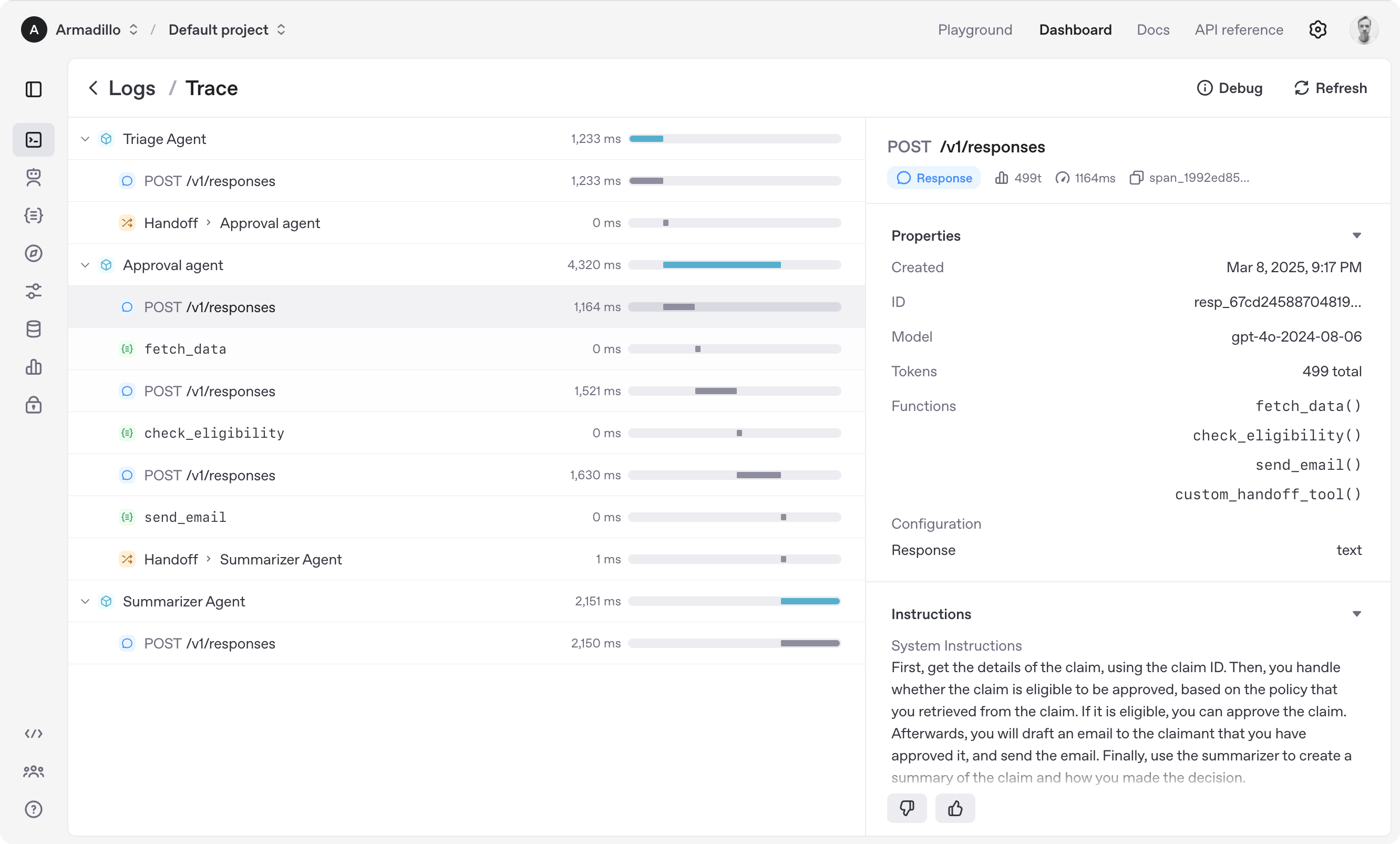
Mental model: agents + handoffs. An agent is a system prompt plus a list of functions. A handoff is a function that returns the next agent. That's it.
Strengths: stunningly lightweight. If you like the Chat Completions API, this feels native. Handoff pattern is easier to reason about than a graph for network-style workflows.
Weaknesses: less structured than LangGraph. Fewer batteries included (no built-in persistence, no built-in observability).
Reach for it when: you want peer-to-peer handoffs (customer service triage is the canonical example) and don't need a big framework.
Anthropic tool use in Claude
Not really a framework — it's the primitive layer everyone else builds on. Claude's tool-use API distinguishes:
- Client tools — you execute the function, send back the result. This is 90% of what you'll use.
- Server tools — Anthropic runs them (web search, web fetch, code execution, tool search). Claude calls them internally without a round-trip through your code.
Every framework above compiles down to a client-tool loop on top of this API (or the OpenAI equivalent). If you can explain the raw tool-use loop, you can explain any framework.
Comparison table
| Framework | Best for | Abstraction | Observability | Learning curve |
|---|---|---|---|---|
| LangGraph | Complex control flow, production systems | State-machine graph | LangSmith (excellent) | Steep |
| CrewAI | Role-based collaboration, content workflows | Roles + tasks + crew | Built-in tracing | Gentle |
| AutoGen | Debate, conversation, research | Conversable agents | Docker sandbox + logs | Medium |
| OpenAI Agents SDK | Handoff patterns, customer service | Agents + handoffs | Traces via platform | Gentle |
| Raw Claude / OpenAI tool use | Full control, minimal deps | Tool call loop | Roll your own | Medium |
Interview line: "I default to LangGraph for anything that needs checkpointing or human-in-the-loop, CrewAI when the problem is genuinely role-based, and raw tool-use for anything simple enough to fit in 50 lines. AutoGen shines when the value is in the conversation between agents." That's a shippable answer.
Worked example: a planner-executor multi-agent workflow


Let's build the pattern the cheatsheet lists on page 2 — a planner decomposes the task into steps, an executor carries out each step with tools, and a critic validates the result. This is the pattern an interviewer is most likely to ask you to whiteboard.
Pseudocode first
1. User submits a goal ("Book me a flight to Madrid next Tuesday under €200")
2. Planner LLM emits a step-by-step plan:
     [search_flights, filter_by_price, present_options, book_selected]
3. Executor LLM runs each step, calling tools:
     - search_flights(destination="MAD", date="2026-07-07")
     - filter_by_price(results, max_price=200)
     - present_options(top_3)
     - wait for user selection
     - book_selected(flight_id)
4. Critic LLM validates the final result against the goal:
     - Was the booking under €200? Correct dates? Confirmation number?
5. If critic rejects → replan. If critic accepts → return.
LangGraph implementation
from typing import TypedDict, Literal
from langgraph.graph import StateGraph, END
from langchain_anthropic import ChatAnthropic

class AgentState(TypedDict):
    goal: str
    plan: list[str]
    step_index: int
    results: list[dict]
    critique: str
    status: Literal["planning", "executing", "critiquing", "done", "replan"]

llm = ChatAnthropic(model="claude-sonnet-4-5-20250929")

def planner_node(state: AgentState) -> AgentState:
    prompt = f"Break this goal into 3-5 concrete steps: {state['goal']}"
    plan = llm.invoke(prompt).content.split("\n")
    return {**state, "plan": plan, "step_index": 0, "status": "executing"}

def executor_node(state: AgentState) -> AgentState:
    step = state["plan"][state["step_index"]]
    result = llm.bind_tools(TOOLS).invoke(f"Execute: {step}")
    return {
        **state,
        "results": state["results"] + [result],
        "step_index": state["step_index"] + 1,
        "status": "critiquing" if state["step_index"] + 1 == len(state["plan"]) else "executing",
    }

def critic_node(state: AgentState) -> AgentState:
    prompt = f"""Goal: {state['goal']}
Results: {state['results']}
Did we satisfy the goal? Reply APPROVED or REJECTED with reasoning."""
    critique = llm.invoke(prompt).content
    status = "done" if "APPROVED" in critique else "replan"
    return {**state, "critique": critique, "status": status}

def route(state: AgentState) -> str:
    if state["status"] == "executing":
        return "executor"
    if state["status"] == "critiquing":
        return "critic"
    if state["status"] == "replan":
        return "planner"
    return END

graph = StateGraph(AgentState)
graph.add_node("planner", planner_node)
graph.add_node("executor", executor_node)
graph.add_node("critic", critic_node)
graph.set_entry_point("planner")
graph.add_conditional_edges("planner", route)
graph.add_conditional_edges("executor", route)
graph.add_conditional_edges("critic", route)

app = graph.compile()
result = app.invoke({
    "goal": "Book me a flight to Madrid next Tuesday under €200",
    "plan": [], "step_index": 0, "results": [], "critique": "", "status": "planning",
})
The same thing in CrewAI
from crewai import Agent, Task, Crew, Process

planner = Agent(
    role="Travel Planner",
    goal="Decompose travel goals into concrete steps",
    backstory="You are a meticulous travel agent who breaks trips into steps.",
    llm="anthropic/claude-sonnet-4-5-20250929",
)
executor = Agent(
    role="Booking Executor",
    goal="Execute each step by calling the right tool",
    backstory="You are a precise executor who never invents arguments.",
    tools=[search_flights_tool, filter_by_price_tool, book_flight_tool],
)
critic = Agent(
    role="Travel Critic",
    goal="Validate the final booking against the user's original goal",
    backstory="You are a paranoid quality checker who catches every mistake.",
)

plan_task = Task(description="Plan the trip: {goal}", agent=planner)
execute_task = Task(description="Execute the plan step by step.", agent=executor, context=[plan_task])
critique_task = Task(description="Validate the result against: {goal}", agent=critic, context=[execute_task])

crew = Crew(
    agents=[planner, executor, critic],
    tasks=[plan_task, execute_task, critique_task],
    process=Process.sequential,
)
result = crew.kickoff(inputs={"goal": "Book me a flight to Madrid next Tuesday under €200"})
Look at the two implementations side-by-side. LangGraph gives you explicit control over the graph and can replan — you can see the state machine. CrewAI reads like a description of a team but a straight sequential run is what you get by default. Both are correct. The right framework depends on whether you value control (LangGraph) or ergonomics (CrewAI).
Agent evaluation


Model evaluation is graded by "did the model return the right token?" Agent evaluation is graded by "did the whole trajectory achieve the goal?" — and that is dramatically harder.

Five things you evaluate for agents:
- Trajectory correctness — did the agent call the right tools in a reasonable order? LangSmith's
agentevalspackage supports strict trajectory matching (exact sequence) and permissive matching (all required tools called, any order). - Tool selection accuracy — for each turn, did the model pick the right tool? Often scored by an LLM-as-judge.
- Final answer correctness — traditional exact-match / F1 / LLM-judge on the last message.
- Cost — total tokens across all agent turns. This is where multi-agent systems blow up (10 turns × 3 agents × 8k context each = a real bill).
- Latency — end-to-end time. Multi-agent systems often serialize LLM calls, so p50 and p99 latency matter more than for a single-shot chat.
The evaluation stack you'll be asked about:
- LangSmith — traces, trajectory evals, cost + latency attribution, LLM-as-judge templates.
- LangGraph's built-in checkpointer — replay a run from any state, useful for debugging and building regression tests.
- Custom golden datasets — a set of (input, expected trajectory, expected final answer) tuples. Run these on every prompt or model change.
- LLM-as-judge — cheap, scalable, imperfect. Use for coarse regressions, not for the final quality bar.
The interview answer you want: "agent evaluation is trajectory-first — I care about which tools were called and in what order, not just the final answer. LangSmith gives me that for free, and I back it up with a golden dataset of expected trajectories that I run on every prompt change."
Common interview questions
The questions I would prepare word-for-word before the technical loop.
Q1. What's the difference between a workflow and an agent? A workflow is LLM + tools with predefined control flow written in code — you as the developer decide the order of steps. An agent lets the LLM decide the control flow at runtime, using tool calls in a loop until it terminates. Workflows are cheaper, more testable, and easier to reason about. Agents are more flexible but harder to evaluate. Anthropic's "Building effective agents" post recommends starting with workflows and only reaching for agents when the problem genuinely needs dynamic control flow.
Q2. Walk me through the orchestrator (supervisor) pattern. When would you use it? A supervisor LLM sits at the top, receives the user request, and routes to specialist worker agents (research, code, writing). Each worker returns to the supervisor, which synthesises the final answer. Use it when you have distinct specialist roles and a natural coordinator — customer service triage is the canonical example. The trade-off is that the supervisor is a single point of failure and a latency bottleneck; every hop goes through it.
Q3. How do you design a tool description so the LLM calls it correctly? Three things. Say when to call it ("Use this when the user asks about..."). Say when NOT to call it ("Do NOT use this for..."). Describe every parameter with an enum or format constraint if possible. The tool description is a prompt — treat it like one. Vague descriptions produce vague tool calls.
Q4. How do you handle a tool that keeps failing in a production agent? Layered defence. Retries with exponential backoff and jitter for transient failures. Hard timeouts on every tool call. Fallback to a secondary tool if the primary keeps failing. Argument validation with Pydantic before execution. And a circuit breaker — if the tool has failed N times in the last window, stop calling it entirely and route around it, otherwise a broken tool becomes a self-DDoS.
Q5. When would you pick LangGraph over CrewAI? LangGraph when I need explicit control flow, checkpointing, human-in-the-loop, or replan cycles — anything that looks like a state machine. CrewAI when the problem genuinely decomposes into roles collaborating on tasks and I want the code to read like a team description. CrewAI is easier to write; LangGraph is easier to control.
Q6. How do you evaluate an agent?
Trajectory-first. I care about which tools were called and in what order, not just the final answer. Tool selection accuracy per turn, final answer correctness, total cost (tokens), and p50 / p99 latency. LangSmith's agentevals handles trajectory matching; I back it up with a golden dataset of expected trajectories that I run on every prompt or model change.
Q7. What is a handoff, and how does OpenAI's Swarm / Agents SDK use it? A handoff is a function that returns a different agent. When the current agent decides another specialist is better suited to the task, it calls a handoff tool; the framework transfers the conversation state to the new agent and continues the loop there. It's the primitive that makes network (peer-to-peer) multi-agent patterns cheap to build. Handoff loops are the classic failure mode — needs circuit-breaker logic.
Q8. What's the cost trap in multi-agent debate patterns? Debate patterns run N agents on the same problem and vote. You pay N× the tokens, and if the debate goes multiple rounds, N × rounds. Only worth it when correctness matters more than cost — safety review, medical second opinions, hard reasoning tasks where the accuracy lift is measured and material. Otherwise a single agent with self-consistency (sample multiple CoTs) is usually cheaper for similar gain.
Q9. What's a "skill" in the Anthropic / Claude Agent SDK sense? A skill is a reusable capability bundle — tool definitions + instructions + optional worked examples, packaged so an agent can load it on demand. Skills are what an agent can do; subagents are specialists it can delegate to. A subagent typically has its own set of skills.
Q10. How do you defend against the LLM sending malformed arguments to a tool? Validate every argument against a Pydantic schema before executing the tool. On validation failure, don't crash — return a structured error back to the LLM as the tool result, describing what was wrong. Modern models self-correct on the next turn if you tell them exactly what to fix. Never let an unvalidated LLM argument reach a database write.
Wrapping up
If the the interviewer opens with "tell me about a multi-agent system you've built" — start with the pattern (orchestrator, network, sequential, debate), then the tools (with schema and error handling), then the framework (with a one-sentence justification), then evaluation (trajectory + cost + latency). That order signals you have shipped one of these, not just watched a demo.
Read next: Part 6 — Prompting & Reasoning Loops for the ReAct / planner / critic scaffolding this post assumes, and Part 10 — Guardrails & Safety for the prompt-injection defenses you now urgently need because your agent has real tools.
Sources
- Anthropic — Building Effective Agents — the canonical reference on workflows vs agents and the five composable patterns.
- Anthropic — Building agents with the Claude Agent SDK — where the skills + subagents terminology comes from.
- Anthropic Cookbook — Agent Patterns — runnable notebooks for orchestrator, routing, parallel, and evaluator-optimizer patterns.
- Claude Platform Docs — Tool Use Overview — client vs server tools, schema format, and the tool loop.
- LangGraph — Official multi-agent docs — the supervisor, network, and hierarchical patterns with runnable examples.
- LangGraph GitHub — the framework itself.
- LangSmith — Trajectory evaluations — how the AgentEvals package works and what a trajectory match looks like.
- CrewAI Docs — Agents concept — role, goal, backstory, tools, memory model.
- CrewAI GitHub — the framework itself.
- AutoGen arXiv paper (Wu et al., 2023) — the original multi-agent conversation framework paper.
- AutoGen — Multi-agent Conversation docs — conversable agents, group chat, and human-in-the-loop.
- OpenAI Cookbook — Orchestrating Agents: Routines and Handoffs — the original Swarm handoff pattern.
- OpenAI — Orchestration and handoffs (Agents SDK) — the production successor to Swarm.
- OpenAI Swarm GitHub — the educational Swarm framework.
- Portkey — Retries, fallbacks, and circuit breakers in LLM apps — production patterns for tool reliability.
- SHIELDA paper — Structured Handling of Exceptions in LLM-Driven Agentic Workflows — recent research on agentic error handling.