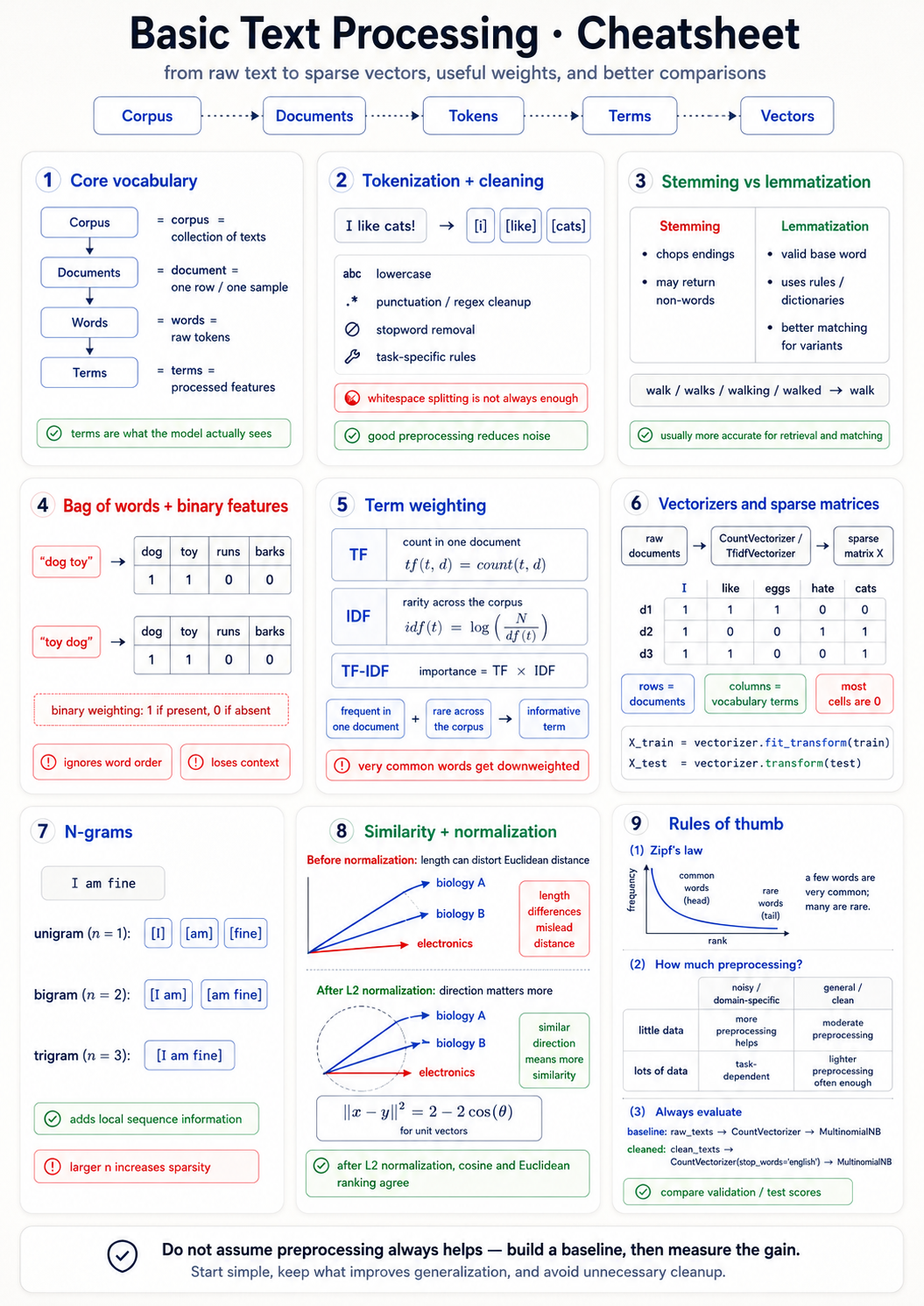
| Term | Meaning |
|---|---|
| Corpus | The dataset — collection of documents |
| Document | One row, one classification target (tweet, article, paragraph) |
| Words | Raw tokens as written |
| Terms | Words after preprocessing — the actual feature columns |
| Vocabulary | Set of all unique terms, size V |
Core terminology
Rule: the document is whatever you're classifying — sentence, paragraph, or chapter, depending on the task.
Bag of words
Split the document into words. Count them. Forget the order.
- "dog toy" and "toy dog" → same vector. Order is lost.
Limitations:
- Word order — gone
- Context — gone
- Synonyms (
doctor/physician) — separate columns - Fillers (
the,a) dominate counts
Still the foundation of every classical NLP system.
CountVectorizer
Each document → vector of length V (vocabulary size).
Matrix shape: N × V · mostly zeros (sparse) · use scipy.sparse.
from sklearn.feature_extraction.text import CountVectorizer
cv = CountVectorizer(lowercase=True, stop_words="english")
X = cv.fit_transform(corpus)
print(cv.vocabulary_)  # word → column index
You always need the word→index map. Without it the matrix is useless.
Weighting schemes
Binary
0 / 1 — does the word appear?
TF
Raw count of word in document.
TF-IDF
TF × log(N / df). Boosts rare informative terms, crushes stop words automatically.
TF-IDF formula: tf-idf(t, d) = tf(t, d) × log(N / df(t))
- Word in every doc →
df = N→ IDF = log(1) = 0 → crushed. - Word in one doc → IDF = log(N) → max boost.
- Log squashes scale (1M docs → ~14, not 1M).
Vector similarity
| Metric | When to use |
|---|---|
| Euclidean | Vectors already L2-normalised, or magnitudes truly matter |
| Cosine | Documents of different lengths — default for NLP |
The long-book trap. A long biology book and a short biology pamphlet → far apart under Euclidean, parallel under cosine. Length ≠ topic.
cosine(u, v) = (u · v) / (‖u‖ · ‖v‖) · cosine_distance = 1 − cosine_similarity
After L2 normalisation, cosine and Euclidean rank the same.
Stop words
Why: extremely common · uninformative · inflate dimensionality · dominate raw counts.
How:
from sklearn.feature_extraction.text import CountVectorizer
cv = CountVectorizer(stop_words="english")
Tradeoff:
- ✅ Classification, search ranking
- ❌ Summarization, generation (you destroy sentence structure)
TF-IDF down-weights stop words automatically — you often don't need a manual list at all.
Tokenization
| Flavour | Unit | Vocabulary | Used by |
|---|---|---|---|
| Word | word | up to 1M+ | classical NLP |
| Subword | piece (un + ##happy) | ~30–50k | BERT, GPT |
| Character | character | ~100 | OCR, low-resource |
| Sentence | sentence | n/a (segmentation) | summarization |
Word-level traps: It's → 1 or 2 tokens? Casing (Cat vs cat)? Punctuation (I hate cats? ≠ I hate cats)? Accents (Naïve vs Naive)?
Languages without spaces (Japanese, Chinese, Thai) → whitespace split is useless. Use a learned segmenter.
Normalization
String-level — collapse surface variants:
| Surface | Target |
|---|---|
U.S.A. / USA / U.S.A | usa |
Cooooool | cool |
Naïve | naive |
running / ran / runs | run |
Vector-level — L1 vs L2:
| Norm | Formula | Result |
|---|---|---|
| L2 | x / √(Σxᵢ²) | Vector length = 1 (default for TF-IDF) |
| L1 | x / Σxᵢ | Cells sum to 1 (probabilistic models) |
Stemming vs Lemmatization
| Stemming | Lemmatization | |
|---|---|---|
| Method | Chop endings via rules | Dictionary + POS |
| Output | May not be a real word | Always a real word |
| Speed | Fast | Slower |
| Example | replacement → replac | replacement → replacement |
| Tool | Porter Stemmer (NLTK) | WordNet (NLTK), spaCy |
from nltk.stem import PorterStemmer, WordNetLemmatizer
PorterStemmer().stem("studies")           # 'studi'
WordNetLemmatizer().lemmatize("studies", pos="v")  # 'study'
Modern transformer pipeline: skip both — subword tokenization collapses morphological variants for free.
Regular expressions
First-pass tool. Often the only tool you need.
import re

# Emails
re.findall(r"[\w\.-]+@[\w\.-]+\.\w+", text)

# Dates 2026-06-29
re.findall(r"\b\d{4}-\d{2}-\d{2}\b", text)

# Strip HTML
re.sub(r"<[^>]+>", "", text)
Used everywhere in NLP:
- Named entities, dates, URLs, currency
- Features inside ML classifiers
- Cleaning before vectorization
Rule of thumb: try regex first. If it dissolves the problem, you don't need a model.