
Table of Contents
- 1. Why this matters even when you have deep learning
- 2. Basic concepts and terminology
- 3. Bag of words — the simplest representation
- 4. CountVectorizer — turning the bag into a matrix
- 5. Weighting schemes — what goes in the cells
- 6. TF-IDF — the upgrade
- 7. Vector similarity — measuring "close"
- 8. Stop words
- 9. Regular expressions — the first model you should try
- 10. Tokenization
- 11. Normalization
- 12. Stemming vs lemmatization
- 13. Putting it together — a simple text-classification workflow
- 14. A quick glossary before you go
- 15. What's next
Last update: June 2026. All opinions are my own.
NLP from Scratch · Part 2/10
📋 In a hurry? Read the one-page cheat sheet — every preprocessing decision, every formula, every trap from this post, condensed for fast revision (or ⌘ P to print it).
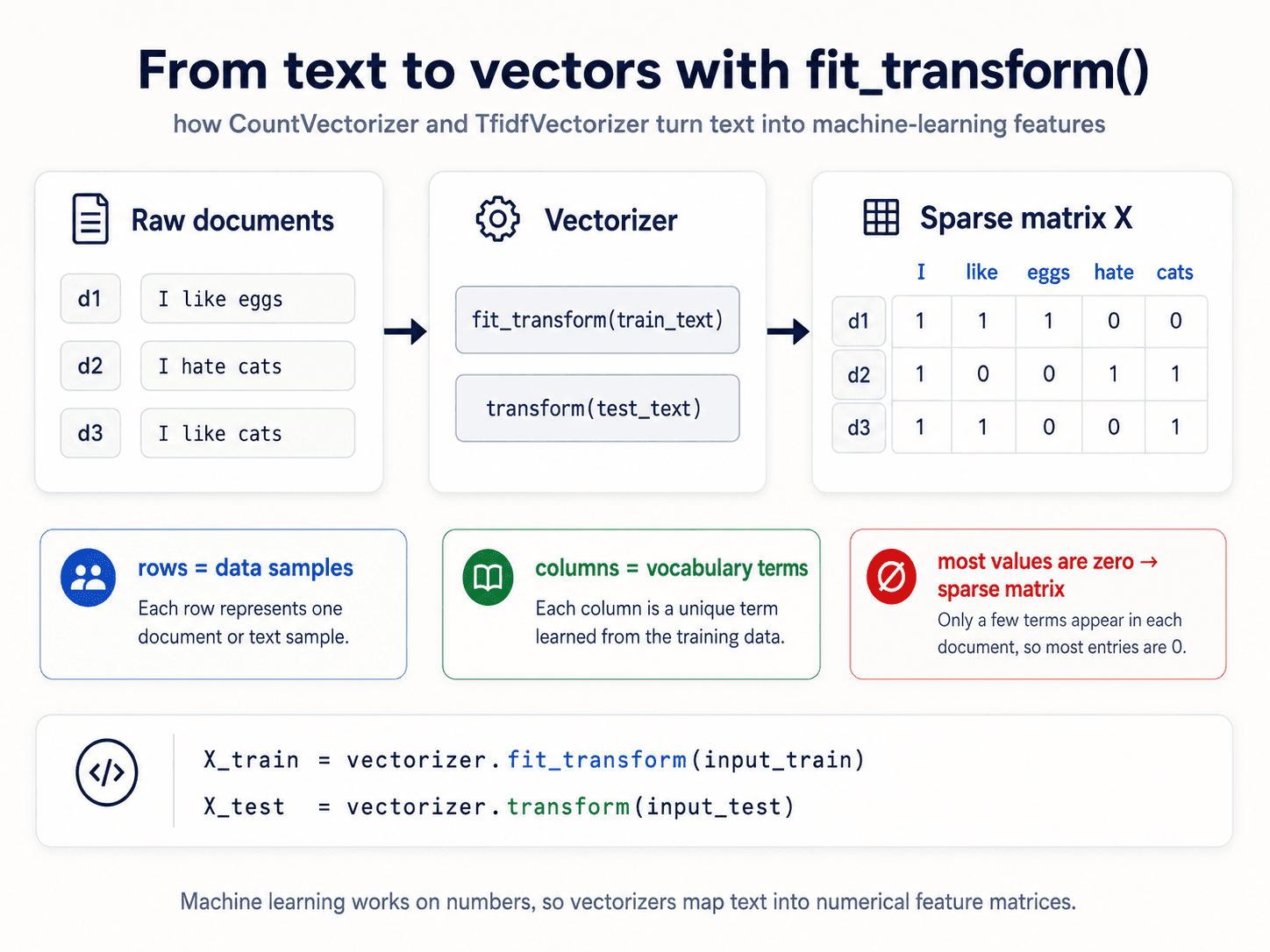
Machine learning only works on numbers. Language is letters. Everything in this post is about closing that gap.
In Part 1 we drew the 5-level NLP ladder. This session lives at the bottom — Level 1 · Morphology. Before any model can do anything interesting with text, somebody has to turn that text into a vector. How you do that turns out to set the ceiling for everything that follows.
Why this matters even when you have deep learning
A reasonable question: if I'm going to throw a transformer at the problem anyway, why am I learning bag of words? Three answers:
- You probably don't need deep learning. For most text-classification problems with a few thousand examples, a TF-IDF vector + logistic regression beats a fine-tuned BERT — and ships in 50 lines. Always ask: does this need ML at all? For a lot of pattern extraction, regex is enough.
- You need to know what the neural net is learning. When you inspect a transformer's attention heads, it turns out it's quietly learning a dependency parse — the same thing you'd compute by hand. You can only see that if you already know what a dependency parse is.
- Preprocessing depends on the data. Wikipedia-trained model on a financial-contracts corpus? Bad call. Small dataset, very specific domain? The preprocessing choices matter much more than the model choice.
Basic concepts and terminology
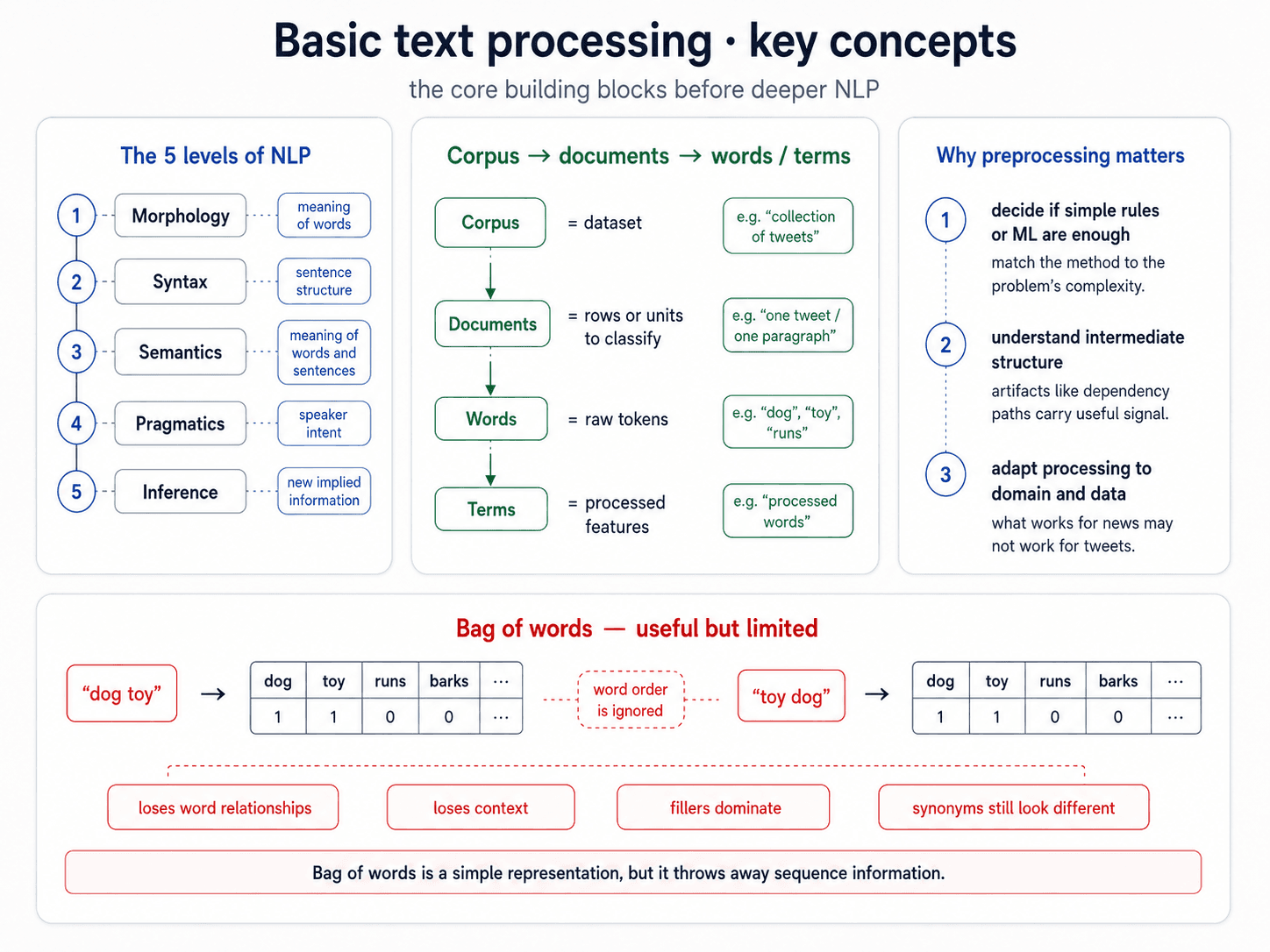
Three words you need to use precisely from now on:
- Corpus — the dataset. A collection of tweets, a collection of Wikipedia pages, a folder of PDFs.
- Document — one row, one classification target. If you classify news articles as sports vs politics, the document is the article. If you classify tweets by sentiment, the document is the tweet. If your "review" actually contains three paragraphs (one about location, one about service, one about food) and you want to classify each paragraph, then the document is the paragraph. The document is whatever your unit of analysis is — sentence, paragraph, chapter, page.
- Words — the components of a document as written. What you see in the raw
.txtfile. Features at their rawest. - Terms — words after preprocessing. The actual columns in your feature matrix. After stop-word removal, lowercasing, stemming.
The whole rest of the post is about how words become terms.
Bag of words — the simplest representation
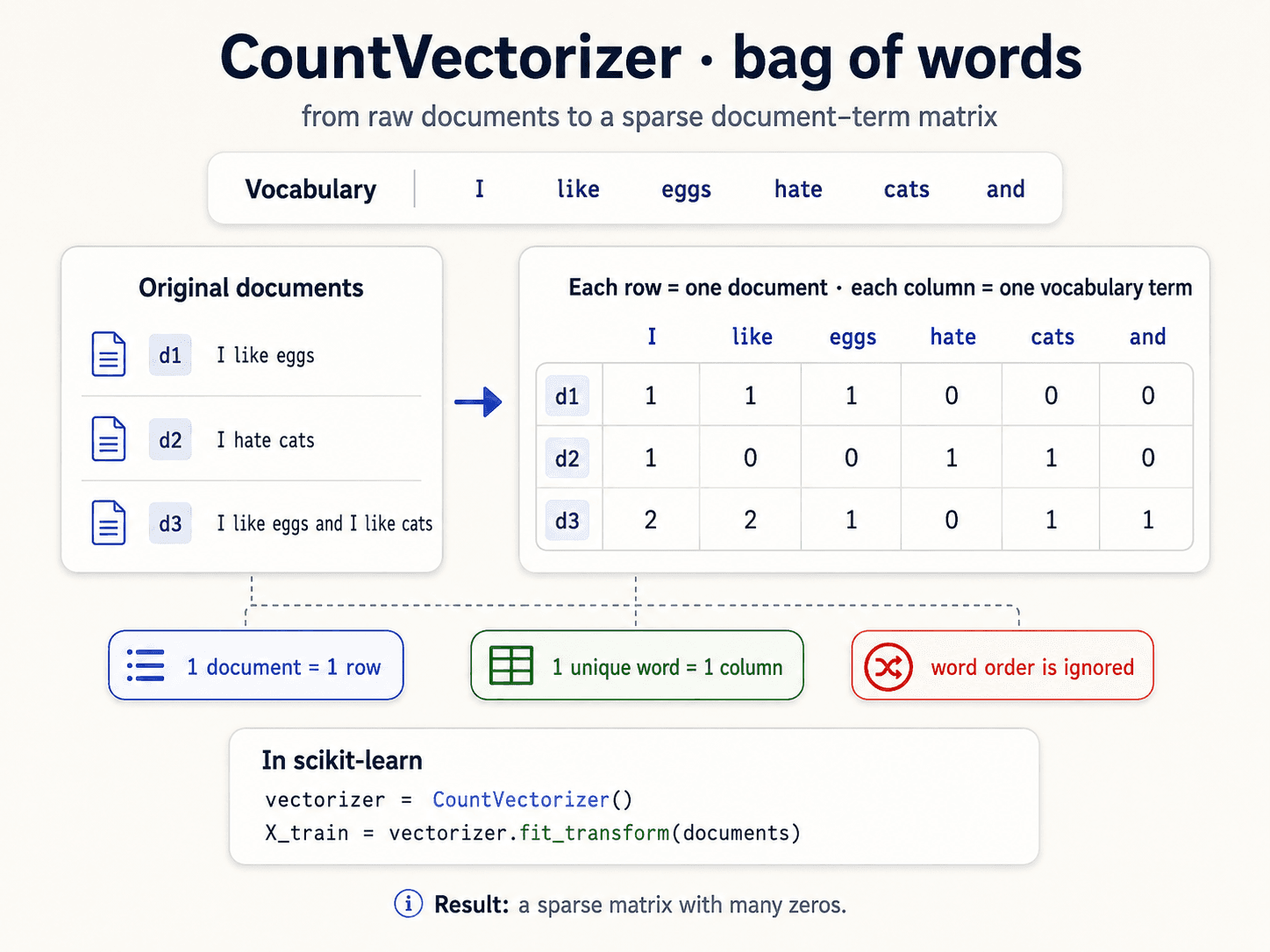
Imagine you have a text-classification problem. Spam vs not spam. You can't feed a string into logistic regression. So you have to turn the email into a vector. The simplest way to do that is to count words.
This is called the bag of words representation: you throw all the words into a bag, count how many of each there are, and forget the order.
The structure you lose is enormous:
- Word order — "dog bites man" and "man bites dog" have the same bag. One is a Tuesday, the other is news.
- Context — "I love this place" in a positive review vs "I love how this place is the worst I've ever been to". Same words, opposite meaning.
- Synonyms — doctor and physician end up as separate columns. Bag of words has no idea they're related. (We'll fix this with embeddings in Part 4.)
Still, the bag of words representation is the foundation of every classic NLP system, and the modern deep models are essentially attempts to fix its limitations.
N-grams — a tiny bit of order, brought back
The cheapest way to recover some word order without changing the bag-of-words mechanics: instead of using single words as features, use consecutive sequences of n words.
![A clean three-card diagram titled 'N-grams' on warm off-white background, dark navy text. Subtitle: 'consecutive sequences of items.' Top strip: 'An n-gram is a sequence of n consecutive items: words, subwords, or characters.' Three side-by-side cards each showing the example sentence 'I am fine' broken down. Card 1 (green) 'Unigram (n = 1)' shows three single-token boxes [I], [am], [fine]. Footer: 'single items.' Card 2 (blue) 'Bigram (n = 2)' shows two paired-token boxes [I am], [am fine]. Footer: 'pairs.' Card 3 (red) 'Trigram (n = 3)' shows one triple-token box [I am fine]. Footer: 'triples.' Bottom row has three info pills: 'word2vec often uses skip-grams', 'Markov models often use bigram probabilities', 'larger n captures more local context but increases sparsity.' Bottom band: 'N-grams add a small amount of sequence information compared with bag of words.'](/_next/image?url=%2Fimages%2Fblog%2Fnlp-from-scratch%2Ftext-to-vectors%2Fn-grams.png&w=3840&q=75)
In scikit-learn:
TfidfVectorizer(ngram_range=(1, 2)) # unigrams + bigramsWhen to bump n above 1:
- Sentiment analysis — "not good" tells you something good alone doesn't.
- Named entities — "New York", "machine learning" are concepts, not two unrelated words.
- Search queries — bigrams are how Google figured out you weren't searching for York alone.
When to keep n = 1:
- Small corpus — bigrams sparsify the matrix fast; you may not have enough data to learn from them.
- Transformer pipeline — self-attention handles word combinations natively. Stick with unigrams (or subwords).
CountVectorizer — turning the bag into a matrix
Concretely: you have a corpus of N documents. You collect every unique word across all of them — that's your vocabulary, size V. Each document becomes a vector of length V, where position i is the count of vocabulary word i in that document.
from sklearn.feature_extraction.text import CountVectorizer

corpus = [
    "the cat sat on the mat",
    "the dog sat on the rug",
    "the cat chased the dog",
]

cv = CountVectorizer()
X = cv.fit_transform(corpus)

print(cv.vocabulary_)   # {'the': 7, 'cat': 1, 'sat': 6, 'on': 5, 'mat': 4, 'dog': 3, 'rug': 5, 'chased': 2}
print(X.toarray())
# [[0 1 0 0 1 1 1 2]   ← 'the' appears twice in doc 0
#  [0 0 0 1 0 1 1 2]
#  [1 1 1 1 0 0 0 2]]
A few things you have to internalise about this matrix:
- Shape:
N × V— rows are documents, columns are vocabulary terms. - It's sparse. Most documents contain a tiny subset of the vocabulary. If your corpus has 50,000 unique words and a tweet has 15 of them, that row is 49,985 zeros. Storing it as a dense matrix is wasteful.
scipy.sparsematrices store only the non-zero entries. - You need a vocabulary mapping — "which column is the word 'cat'?" That's what
cv.vocabulary_is for. Without the mapping, the matrix is useless.
Weighting schemes — what goes in the cells
The matrix shape is always N × V. What changes is what number you put in each cell.
Binary weighting
The crudest version. 1 if the word appears in the document, 0 if it doesn't. No counts.
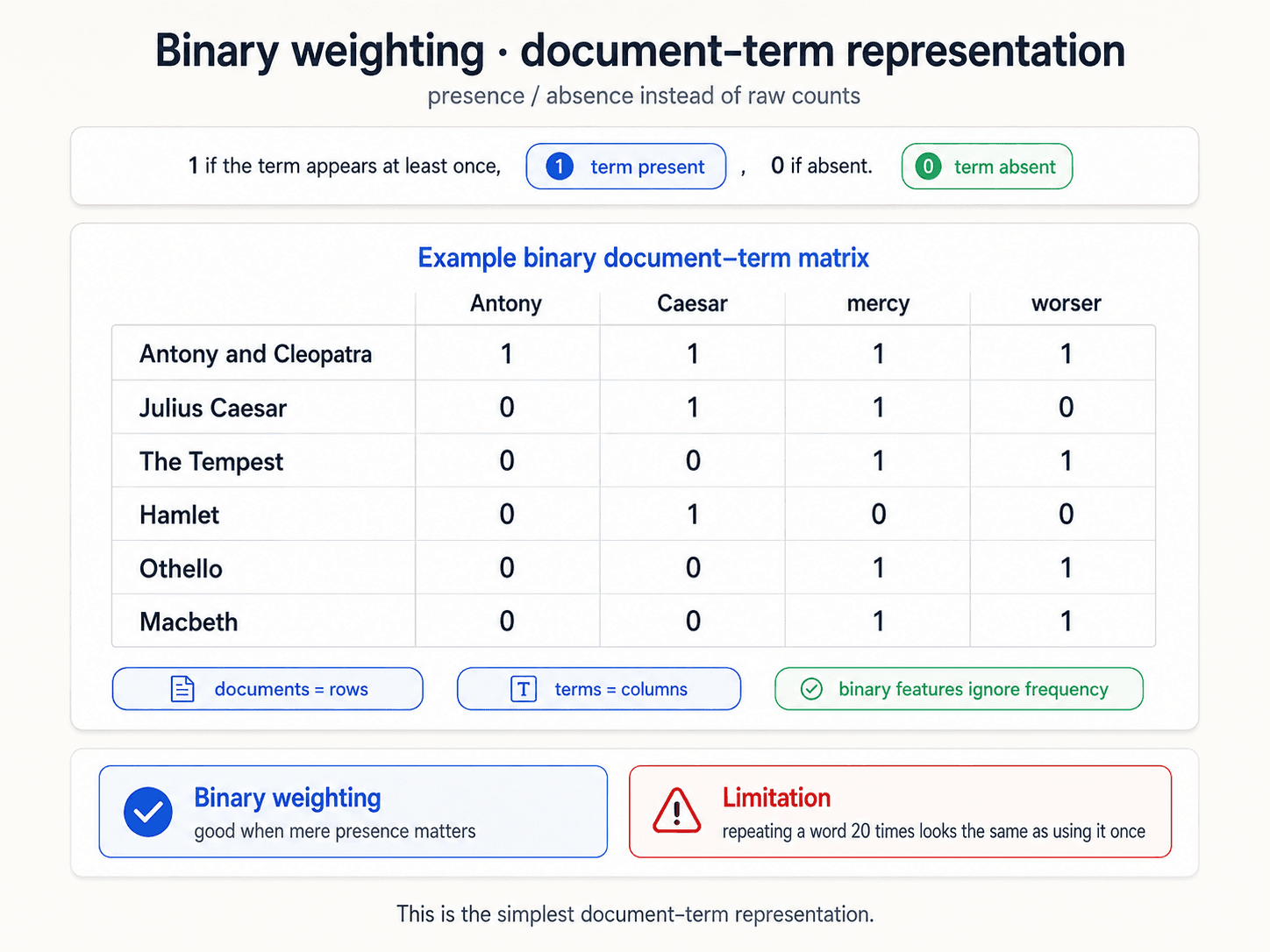
Useful for: presence/absence questions ("does this email contain the word Viagra?"). Loses everything else.
TF — term frequency
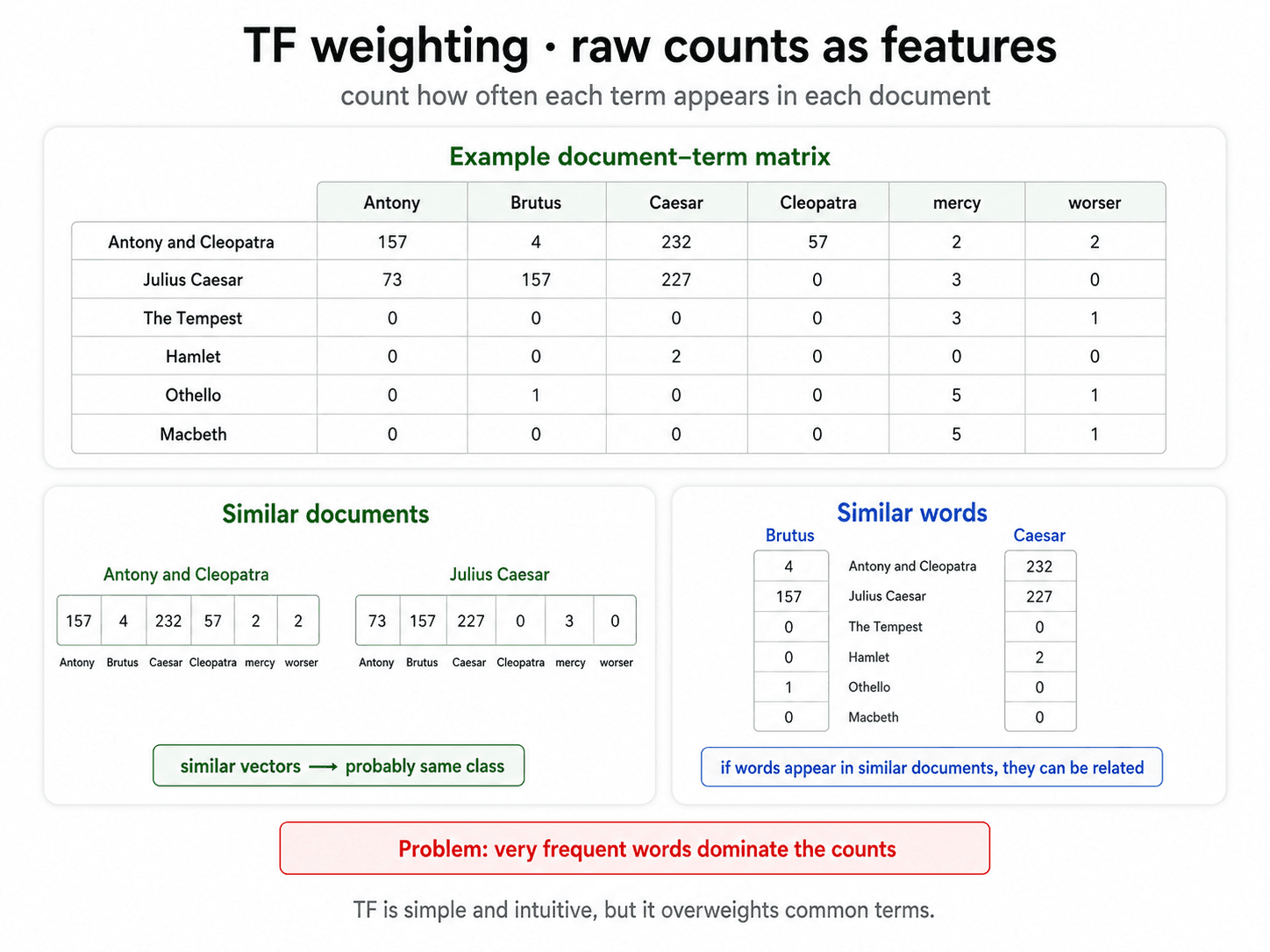
Just count. The cell holds the number of times the word appears in the document.
This lets you reason about similarity: two documents are similar if they contain the same words at similar rates. Distance between row vectors becomes a measure of document similarity. Distance between column vectors becomes a measure of word similarity — "if Brutus and Caesar appear in the same plays at the same rates, they're related words."
The problem with raw counts
The most frequent words are the same in almost every document. the, a, is, of, and. If you measure similarity using raw counts, every document looks like "mostly the word 'the'" — because that's literally true.
You have two options:
- Manually remove stop words — we'll cover this below.
- Down-weight them automatically — TF-IDF.
The second option is better because it doesn't require you to know in advance which words are uninformative for your specific corpus.
TF-IDF — the upgrade
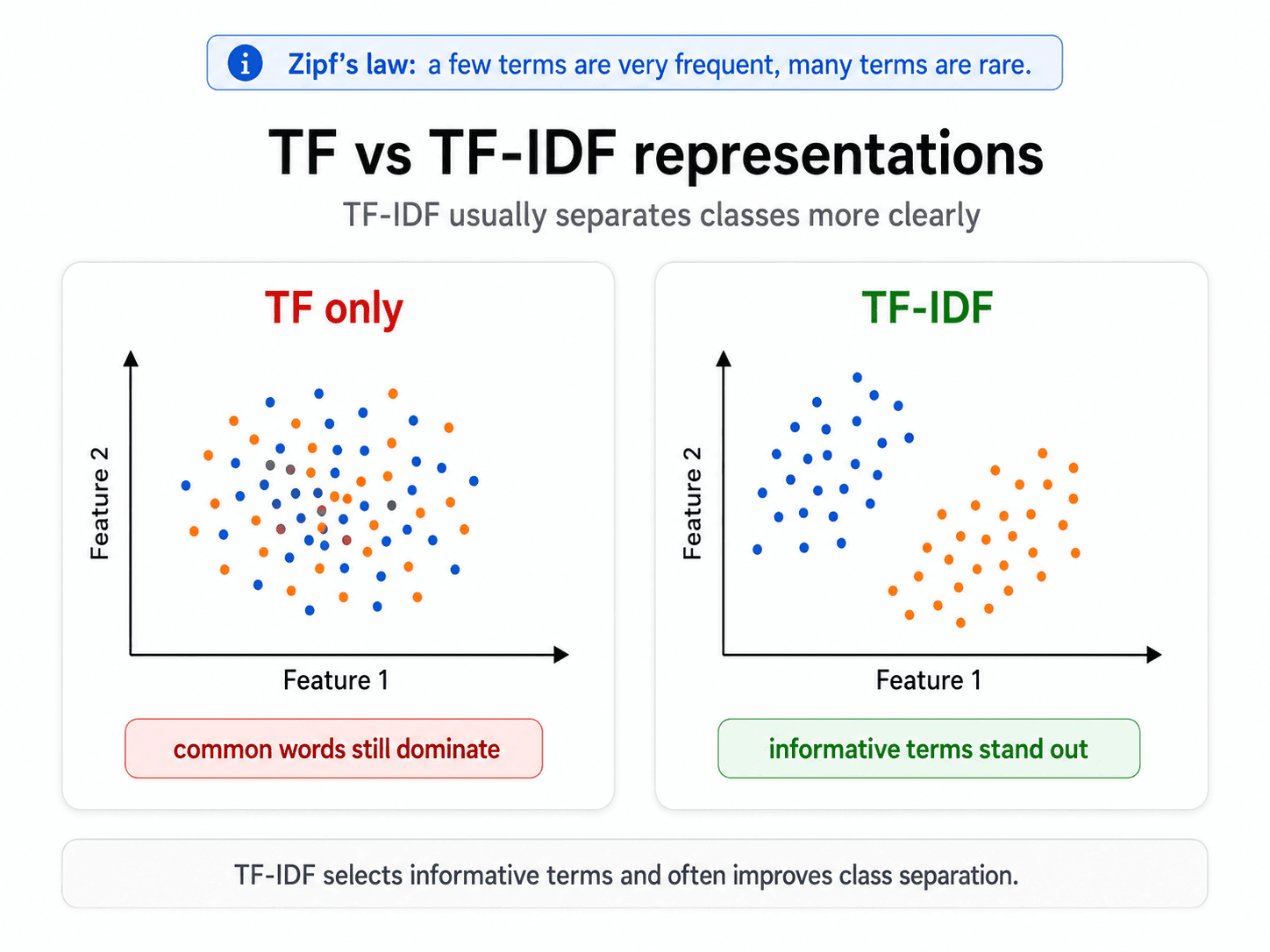
The intuition comes from Zipf's Law: in any natural-language corpus, a few words appear extremely often (the, of, a) and many words appear extremely rarely. The rare ones are usually the informative ones. "Mitochondria" tells you a lot about which document you're looking at. "the" tells you nothing.
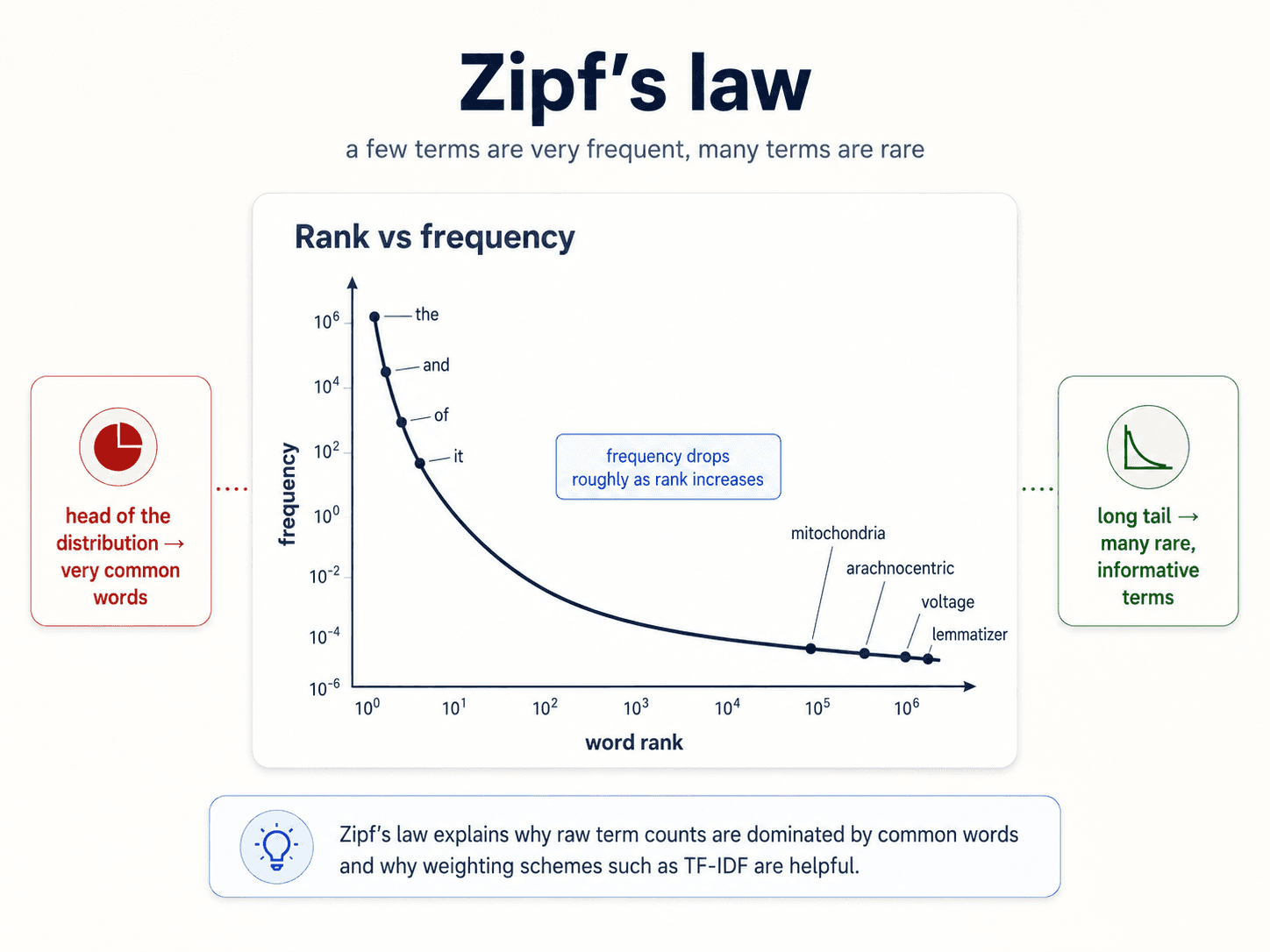
So we want to boost the weight of rare-but-present terms and crush the weight of terms that appear everywhere.
The math
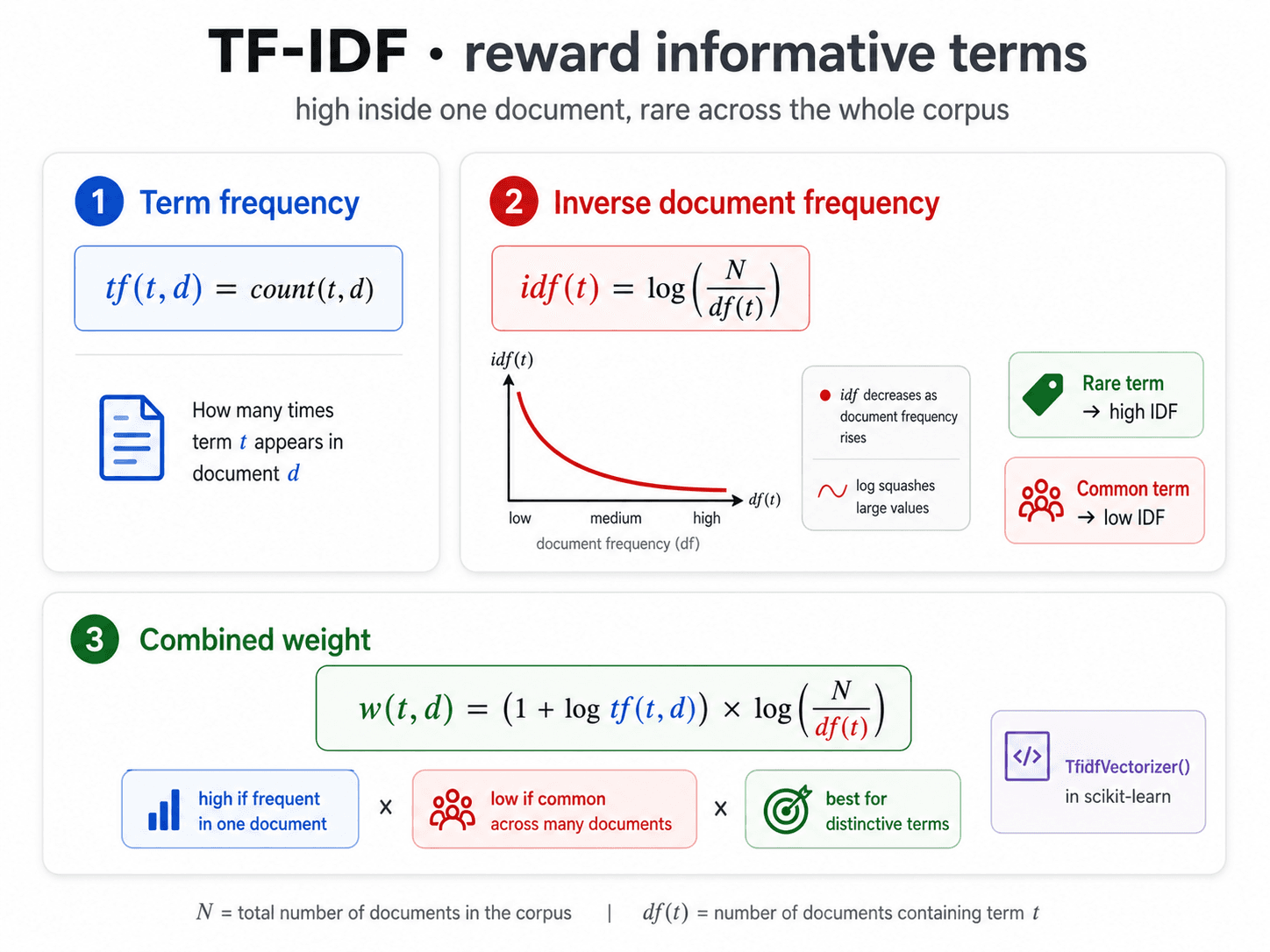
TF-IDF(t, d) = TF(t, d) × IDF(t)
Where:
- TF(t, d) — term frequency. How many times does term
tappear in documentd? Two arguments because the same word has a different count in every document. - IDF(t) — inverse document frequency. How rare is this term across the entire corpus? One argument because it doesn't depend on a specific document.
IDF(t) = log( N / df(t) )
Where:
N= total number of documents in the corpusdf(t)= document frequency — the number of documents in which termtappears at least once
Why the log? If your corpus has 1,000,000 documents and a term appears in 10 of them, N/df = 100,000. Without the log, that single term would dominate everything. The log squashes the scale: log(100,000) ≈ 11.5. Suitable, not insane.
What this does in practice
- A word that appears in every document has
df = N, soIDF = log(N/N) = log(1) = 0. Multiplied by anything, you get 0. Stop words get crushed automatically. - A word that appears in one document has
df = 1, soIDF = log(N). Maximum boost. - Everything else falls between.
So "the" gets crushed even if you didn't tell the system it was a stop word. "Mitochondria" gets boosted even if you didn't tell the system it was important. That's the magic.
Normalising TF-IDF
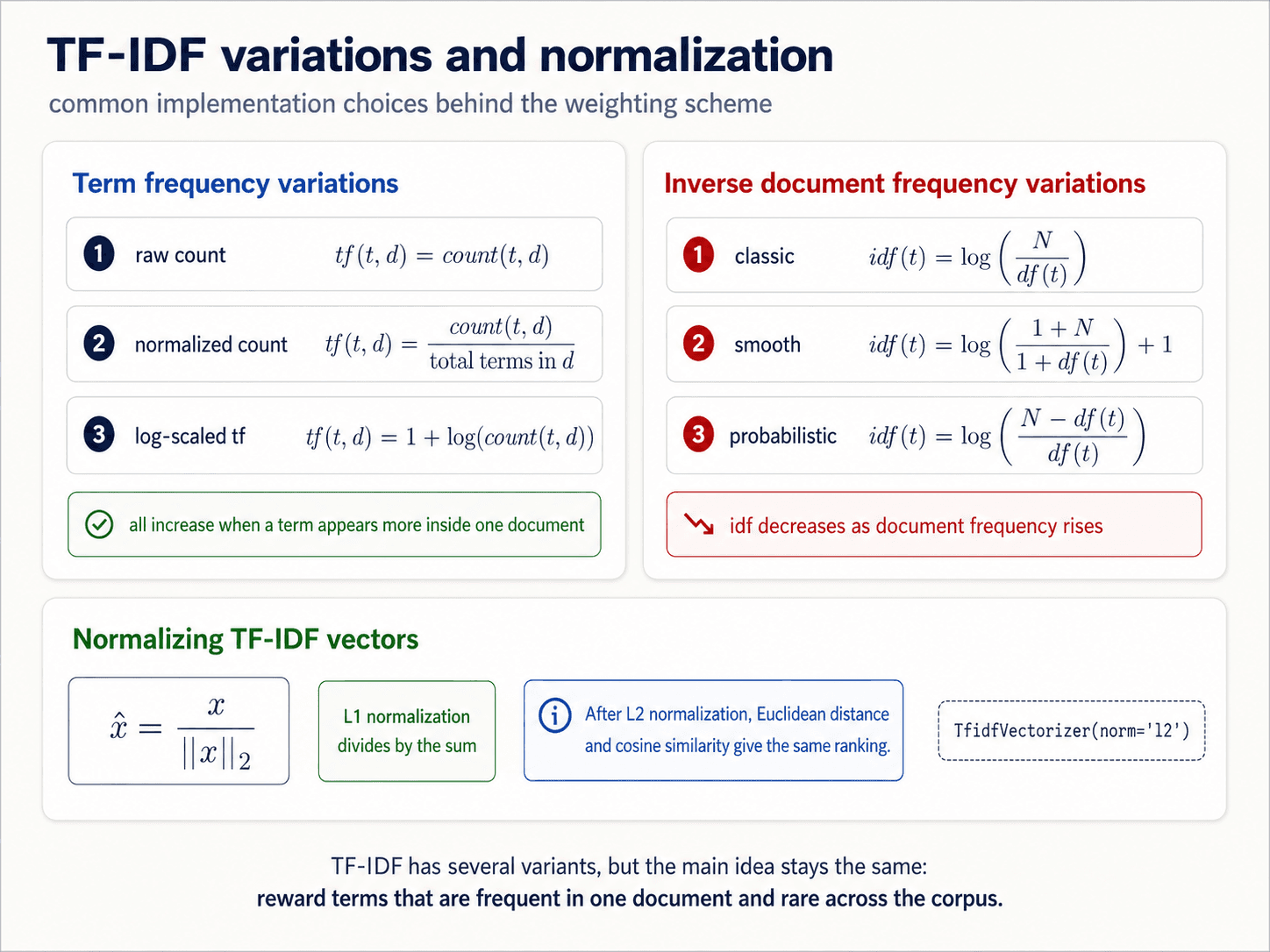
The last step: divide each row vector by its L2 norm so its length is 1. This way document length doesn't matter — a long article and a short tweet about the same topic end up close together, instead of the long article having huge counts in every cell.
This is also why Euclidean distance and cosine similarity become equivalent after L2 normalisation, which we'll see below.
In scikit-learn:
from sklearn.feature_extraction.text import TfidfVectorizer

tv = TfidfVectorizer()       # tokenizes + counts + applies TF-IDF + L2-normalises
X = tv.fit_transform(corpus)
One line. Behind it, the whole pipeline of counting, log-scaling, and normalisation.
Vector similarity — measuring "close"
Now every document is a point in a V-dimensional space. How close are two documents? You need a distance.
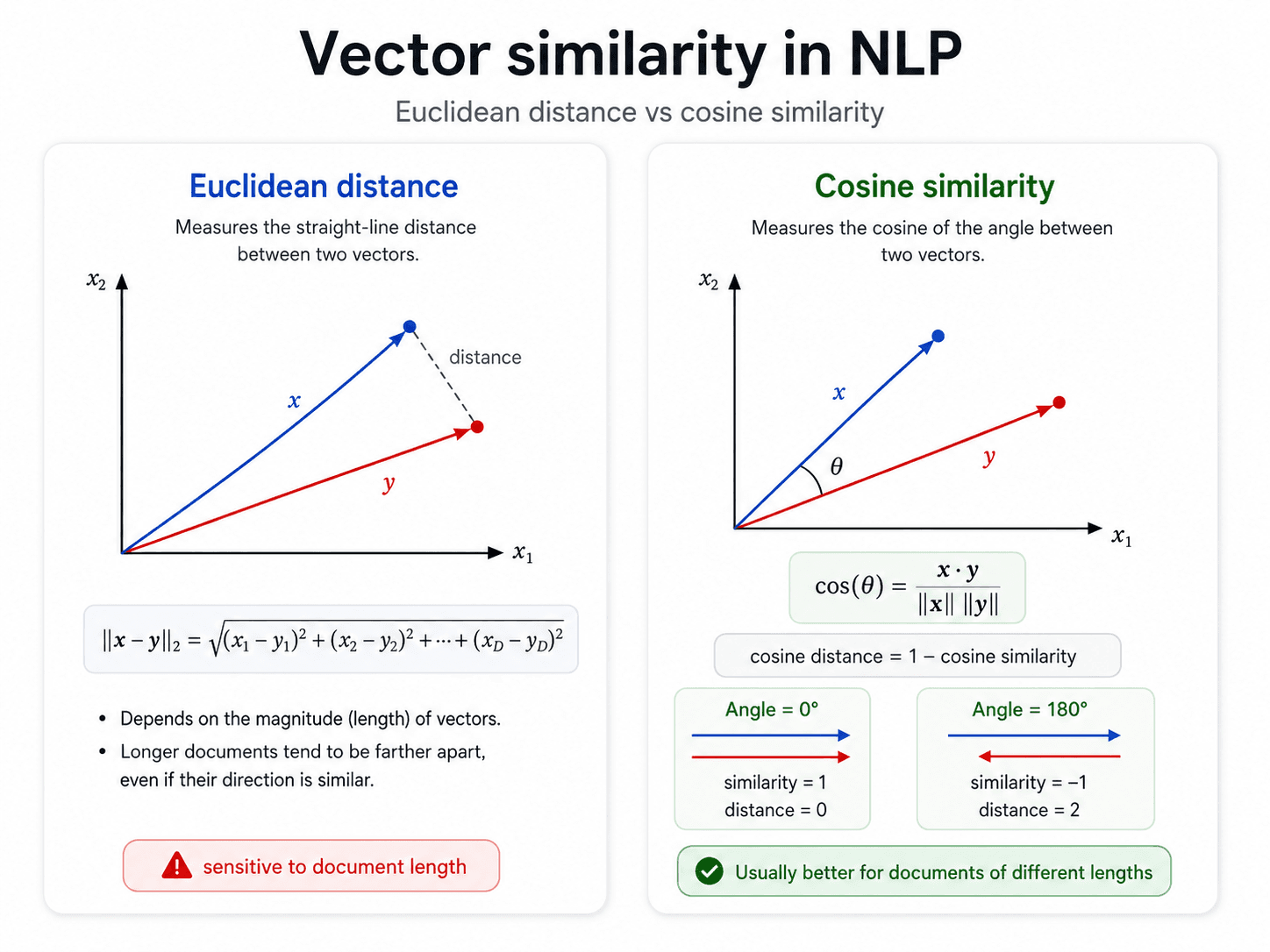
Euclidean distance
The straight-line "as the crow flies" distance.
d(u, v) = √( Σ (uᵢ − vᵢ)² )
Intuitive — same way you'd measure on a map. But it has a quiet failure mode for documents.
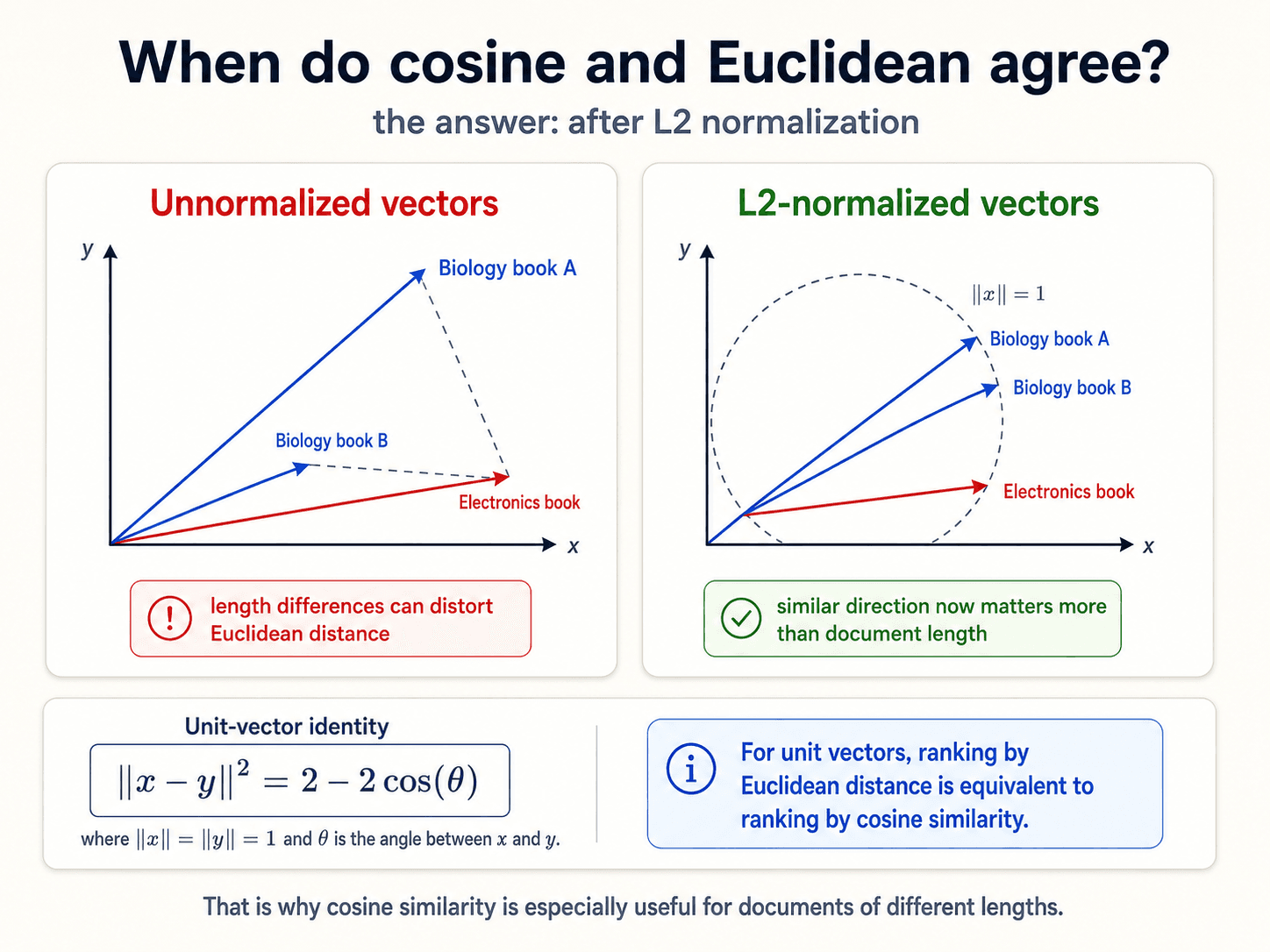
The long-book / short-book trap
Imagine three books, two vocabulary terms: mitochondria and voltage.
- Book A: a long biology textbook. Mitochondria appears 800 times, voltage 0.
- Book B: a short biology pamphlet. Mitochondria appears 30 times, voltage 0.
- Book C: a short electronics manual. Mitochondria 0, voltage 25.
Vectors:
| Book | mitochondria | voltage |
|---|---|---|
| A | 800 | 0 |
| B | 30 | 0 |
| C | 0 | 25 |
Compute Euclidean distance:
d(A, B) = √((800-30)² + 0²) = 770d(B, C) = √(30² + 25²) ≈ 39
The biology pamphlet is closer to the electronics manual than to the biology textbook. That's wrong. They're closer only because they have similar lengths.
Cosine similarity to the rescue
Cosine measures the angle between two vectors, not the distance between their tips.
cosine(u, v) = (u · v) / (‖u‖ · ‖v‖)
- Two vectors pointing the same way (parallel) → cosine = 1
- Two vectors at 90° → cosine = 0
- Two vectors pointing opposite ways → cosine = −1
cosine distance = 1 − cosine similarity
For our three books:
- Books A and B both point straight up the
mitochondriaaxis. Angle = 0°. Cosine similarity = 1. Cosine distance = 0. - Book C points straight right along
voltage. Angle to A = 90°. Cosine similarity = 0. Cosine distance = 1.
Now the biology books are closest to each other, regardless of length. This is why cosine is the default in NLP.
When they're equivalent
Two cases:
- After L2 normalisation. Once every vector has length 1, Euclidean and cosine produce the same ranking. (Mathematically:
‖u − v‖² = 2 − 2·(u · v)when‖u‖ = ‖v‖ = 1.) That's whyTfidfVectorizerL2-normalises by default — it makes everything downstream cheaper. - When you only care about ranking, not absolute distance. Search engines, recommendation systems — you just need to know "which document is most similar", not the actual similarity score. Either metric works.
Stop words
The other way to handle common-word dominance. Curate a list of words you'll just remove before vectorising. the, a, is, of, and, to, in.
Why use them
- They're extremely common and appear in almost every document.
- They're uninformative — they don't help you distinguish positive reviews from negative ones.
- They increase dimensionality. Every stop word is a column you have to allocate memory for.
- They distort distance. With raw counts, their huge values overpower the small ones that actually matter.
How to use them
from sklearn.feature_extraction.text import CountVectorizer
cv = CountVectorizer(stop_words="english")  # uses sklearn's default English list
Or with NLTK:
from nltk.corpus import stopwords
stop = set(stopwords.words("english"))
tokens = [w for w in tokens if w not in stop]
You can also add domain-specific stop words — HTML tags, common boilerplate text in financial filings, repeated email signatures. Whatever shows up in every document of your corpus and isn't discriminative.
The tradeoff
Stop words consider words individually. They don't know about sentence structure.
- OK for: spam classification, sentiment analysis, topic classification — where you only care about which words appear.
- Bad for: text summarization, machine translation, anything generative — where word order and function words are part of the meaning.
❌ Myth: "Stop words should always be removed." ✅ Reality: It depends on the task. Classification — yes. Summarization or generation — no, you'd destroy the sentence structure. Also: TF-IDF down-weights stop words automatically, so you often don't need a manual list at all.
![A clean two-card cleaning-text diagram titled 'Cleaning text · stopwords and regular expressions' on warm off-white background, dark navy text. Subtitle: 'remove low-information terms and use rule-based patterns.' Two side-by-side cards. Left card (blue accent) titled 'Stopwords' with a 🚫 icon. Three bullets: extremely common, little discriminative value, more dimensions = more computation. Two code snippets: CountVectorizer(stop_words='english') and stopwords.words('english'). Below that, 'Example stopwords' showing: the, is, are, I, me, my. A red alert card at the bottom: '! Be careful: removing stopwords can hurt tasks that need sentence structure.' Right card (green accent) titled 'Regular expressions' with a .* icon. A 6-row pattern table: ^abc / abc$ / ab* / \\d+ / \\w+ / [abc] with plain-English meanings. Two sub-panels: 'Validate email addresses' with a code snippet using re.compile and email_pattern.match; and 'Filter unwanted content' with a code snippet using re.sub and re.IGNORECASE. Blue info pill at the bottom: 'Great for dates, links, entities, and text cleaning.' Footer band: 'Stopwords simplify the vocabulary; regex captures hand-written rules.'](/_next/image?url=%2Fimages%2Fblog%2Fnlp-from-scratch%2Ftext-to-vectors%2Fstopwords-and-regex.png&w=3840&q=75)
Regular expressions — the first model you should try
Regex is a formal language for specifying text patterns. In NLP it shows up everywhere:
- First-pass extraction — pull dates, currency, URLs, emails, phone numbers, named entities out of raw text with a single pattern.
- As features inside an ML classifier — "does this string match the regex for a tracking number?" becomes a binary feature.
- For cleaning — strip HTML tags, normalise whitespace, remove emoji.
import re

# Extract email addresses
emails = re.findall(r"[\w\.-]+@[\w\.-]+\.\w+", text)

# Match dates like 2026-06-29
dates = re.findall(r"\b\d{4}-\d{2}-\d{2}\b", text)

# Strip HTML tags
clean = re.sub(r"<[^>]+>", "", text)
The rule of thumb: try regex first. If your problem dissolves under a 10-line pattern, you don't need a model.
Full Python regex reference: docs.python.org/3/library/re.html.
Tokenization
Tokenization is the operation that converts a raw string into a list of tokens. It is the foundational step of everything above, and it is way more nuanced than it looks.
![A clean overview diagram titled 'Tokenization · split text into units' on warm off-white background, dark navy text. Subtitle: 'from raw text to words, sentences, and pieces.' Top strip shows a simple example flow: 'I like cats' → s.split() → ['I', 'like', 'cats']. Below, three side-by-side cards. Card 1 (blue, 🎯 icon) 'Why tokenize?': turn text into manageable units, prepare for vectorization, enable downstream NLP. Card 2 (green, ⚠ icon) 'Common issues': punctuation, casing, accents, contractions, hashtags, named entities, abbreviations. Card 3 (purple, 🌐 icon) 'Language issues': French l'ensemble, German compound words (Lebensversicherungsgesellschaft), Chinese/Japanese with no spaces between words (example characters shown). A blue banner pill at the bottom: '✓ Different tasks need different tokenizers.' Footer line in slate-grey: 'Examples: tweet tokenizers, domain-specific tokenizers, multilingual tokenizers.'](/_next/image?url=%2Fimages%2Fblog%2Fnlp-from-scratch%2Ftext-to-vectors%2Ftokenization-overview.png&w=3840&q=75)
Word tokenization
The default. Split the document into words. Looks easy until you start asking questions:
- How do you count words? "It's" — is that one token or two? (
It+'s?) - Casing. Is
Catthe same ascat? Most of the time yes —sklearn.CountVectorizer(lowercase=True)does it for you. - Punctuation. Punctuation may carry meaning. For sentiment: "I hate cats" vs "I hate cats?" — the question mark changes the polarity.
CountVectorizerignores punctuation by default. Sometimes you want to keep it. - Accents.
NaïvevsNaive.CountVectorizer(strip_accents="unicode")normalises them. Or do it manually:import unicodedata norm = "".join(c for c in unicodedata.normalize("NFKD", text) if not unicodedata.combining(c)) - Language differences. Japanese, Chinese, Thai don't use whitespace —
text.split()returns the whole sentence as one token. Useless. You need a learned segmenter.
A note from Part 1: this is why nltk and spaCy disagree on the same sentence. There's no canonical "word." See my project post for what that looks like in practice.
Subword tokenization — what BERT does
The modern default. Instead of treating every word as an atomic unit, split rare words into smaller pieces.
unhappy → un + ##happy
walking → walk + ing
tokenization → token + ##ization
Why this is clever:
- Smaller vocabulary. You don't need a separate column for
walk,walks,walking,walked— they share thewalktoken plus a suffix. walkandwalkingare now related. A model treating them as separate words has no way to know they're related. With subwords, they share a token by construction.- Out-of-vocabulary words become rare. Even a word the model has never seen can be decomposed into subwords it has seen.
- Translation parity. Spanish
ordenadorandordenadorescollapse the same way Englishcomputerandcomputersdo.
Subword tokenizers are learned from data — you tell the algorithm a target vocabulary size and it figures out the optimal subword set. Common algorithms: BPE (Byte-Pair Encoding, used by GPT), WordPiece (used by BERT), SentencePiece (used by T5, mBART).
![A clean three-card diagram titled 'Beyond simple tokenization' on warm off-white background, dark navy text. Subtitle: 'sentence segmentation, character models, and subwords.' Three side-by-side cards. Card 1 (blue) titled 'Sentence segmentation' with description 'Split text into sentences using punctuation (. ? !) to create clean units.' Four small example sentences stacked vertically. Then a dashed info card: 'periods can be ambiguous: Dr. , Inc. , 4.3'. Blue pill at the bottom: 'use a pretrained sentence tokenizer.' Card 2 (green) titled 'Character-based tokenization' with the example word 'cats' inside a green-bordered box, a green arrow downward, then the result [c, a, t, s] shown as separate boxed letters. Three green bullets: small vocabulary, easy for computers, useful in deep learning. Card 3 (purple) titled 'Subword tokenization' with description 'Split words into meaningful pieces (subwords).' Two examples shown: 'walking → walk + ing' and 'computers → computer + s' visualised as boxes with arrows. Green pill: '✓ helps relate similar words.' Red pill: '⚠ word meaning still depends on the task.' Bottom band with light-bulb icon: 'Word, character, and subword tokenization each solve different problems.'](/_next/image?url=%2Fimages%2Fblog%2Fnlp-from-scratch%2Ftext-to-vectors%2Fbeyond-simple-tokenization.png&w=3840&q=75)
Character-based tokenization
Each character is a token.
- Tiny vocabulary — for English, ~100 characters covers basically everything.
- No out-of-vocabulary problem — every word is decomposable.
- Tradeoff: each token holds almost no meaning on its own. The model has to learn word-shapes from sequences of characters, which costs you compute and parameters.
Used in some character-level language models, in OCR pipelines, and in low-resource languages where subword training data is scarce.
Sentence segmentation
A different problem: given a paragraph, where do sentences begin and end?
In English it's mostly "split on ., !, ? followed by whitespace and a capital letter" — except for Mr., Dr., U.S.A., ellipses, decimal numbers, abbreviated dates. NLTK's default sentence tokenizer (punkt) handles these with a learned model trained on millions of sentences. Use it. Don't roll your own.
from nltk.tokenize import sent_tokenize
sentences = sent_tokenize(paragraph)
Normalization
After tokenization you'll discover the same concept has multiple surface forms in your corpus. These two issues run on parallel tracks:
- String-level normalisation — make the same word look the same.
- Vector-level normalisation — make documents of different lengths comparable.
String-level
- Punctuation in tokens.
U.S.A.andUSAandU.S.Aneed to collapse. Regex:text = re.sub(r"\.", "", text) - Non-alphanumeric chars.
coooooolandcoolandcooolshould collapse. One approach: collapse repeated letters to two.text = re.sub(r"(.)\1{2,}", r"\1\1", text) - Spelling mistakes. Harder. Spellcheckers (
pyspellchecker,symspell) or fuzzy matching (Levenshtein distance) help. Often regex is enough for the common cases.
The general rule: even if you're using deep learning, normalise. It's free compute saved.
Vector-level — L1 vs L2
Once you have count vectors, document length distorts them. A 500-word article and a 50-word tweet about the same topic will have wildly different absolute counts.
- L2 normalisation. Divide each vector by
√(Σ xᵢ²). After this the vector has length 1. This is whatTfidfVectorizerdoes by default. Makes cosine similarity and Euclidean distance equivalent. - L1 normalisation. Divide each vector by
Σ xᵢ. After this the elements sum to 1 — every cell becomes the probability that a random token from this document is this word. Useful for probabilistic models.
from sklearn.preprocessing import normalize
X_l2 = normalize(X, norm="l2")
X_l1 = normalize(X, norm="l1")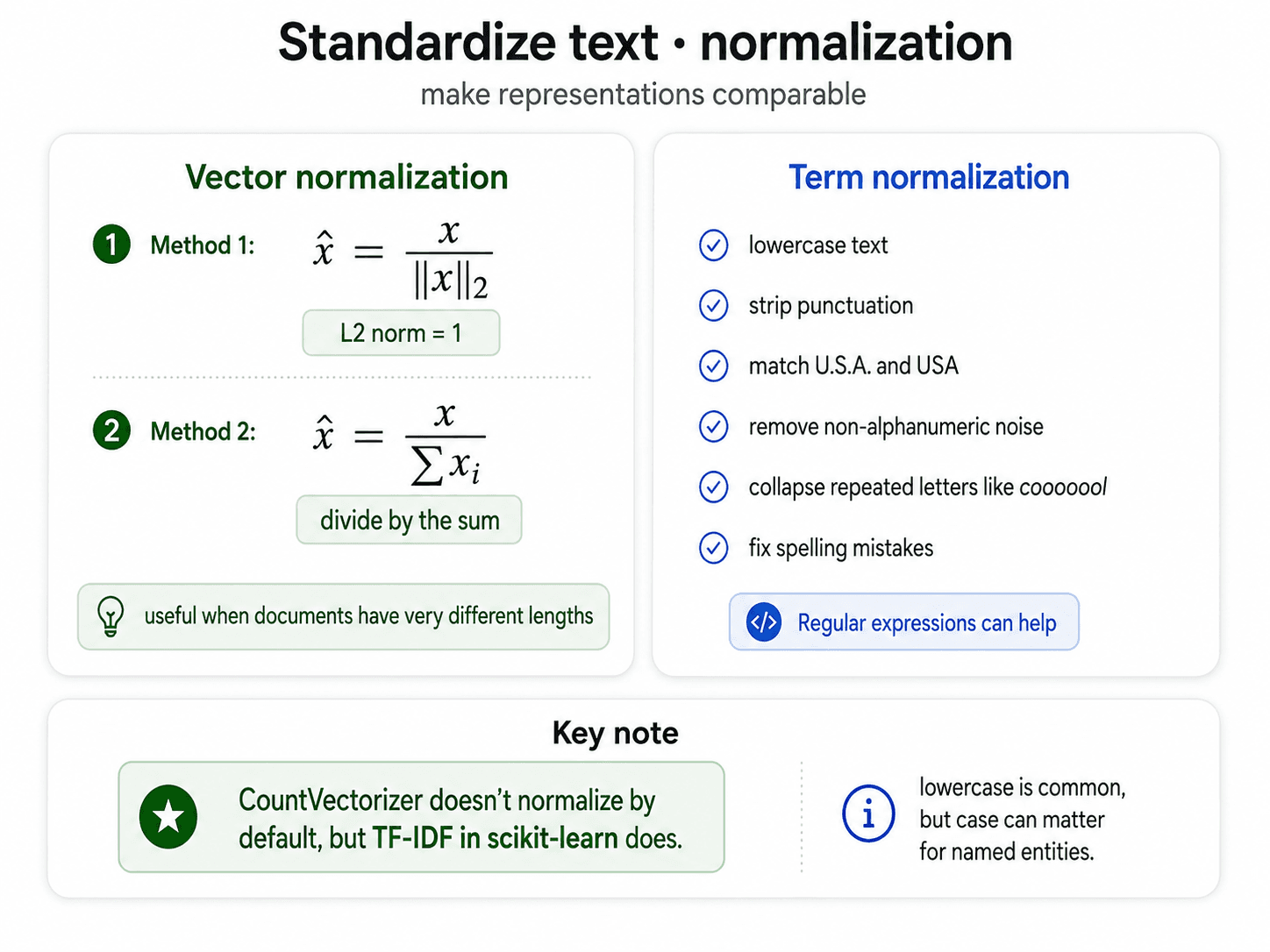
Stemming vs lemmatization
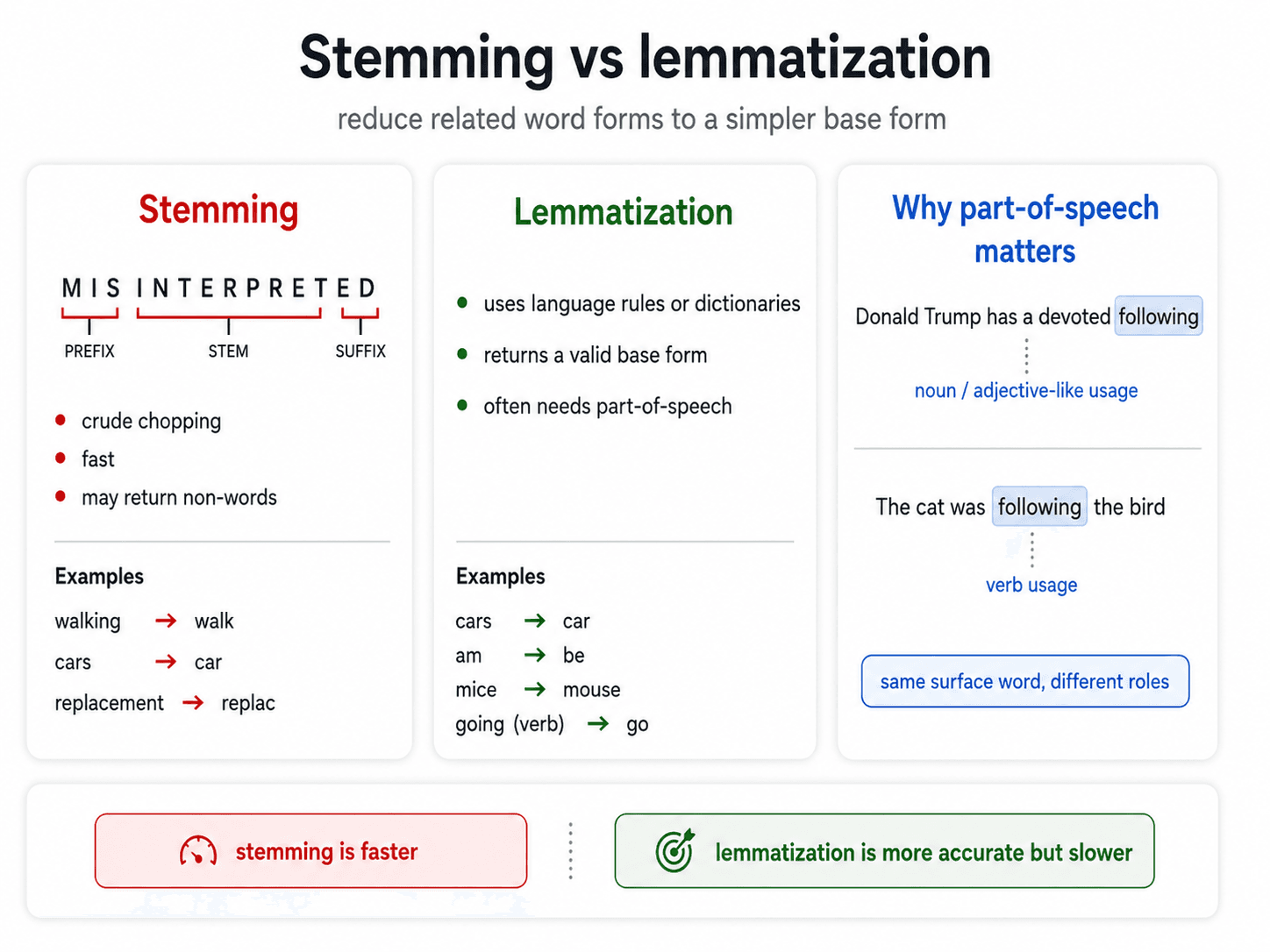
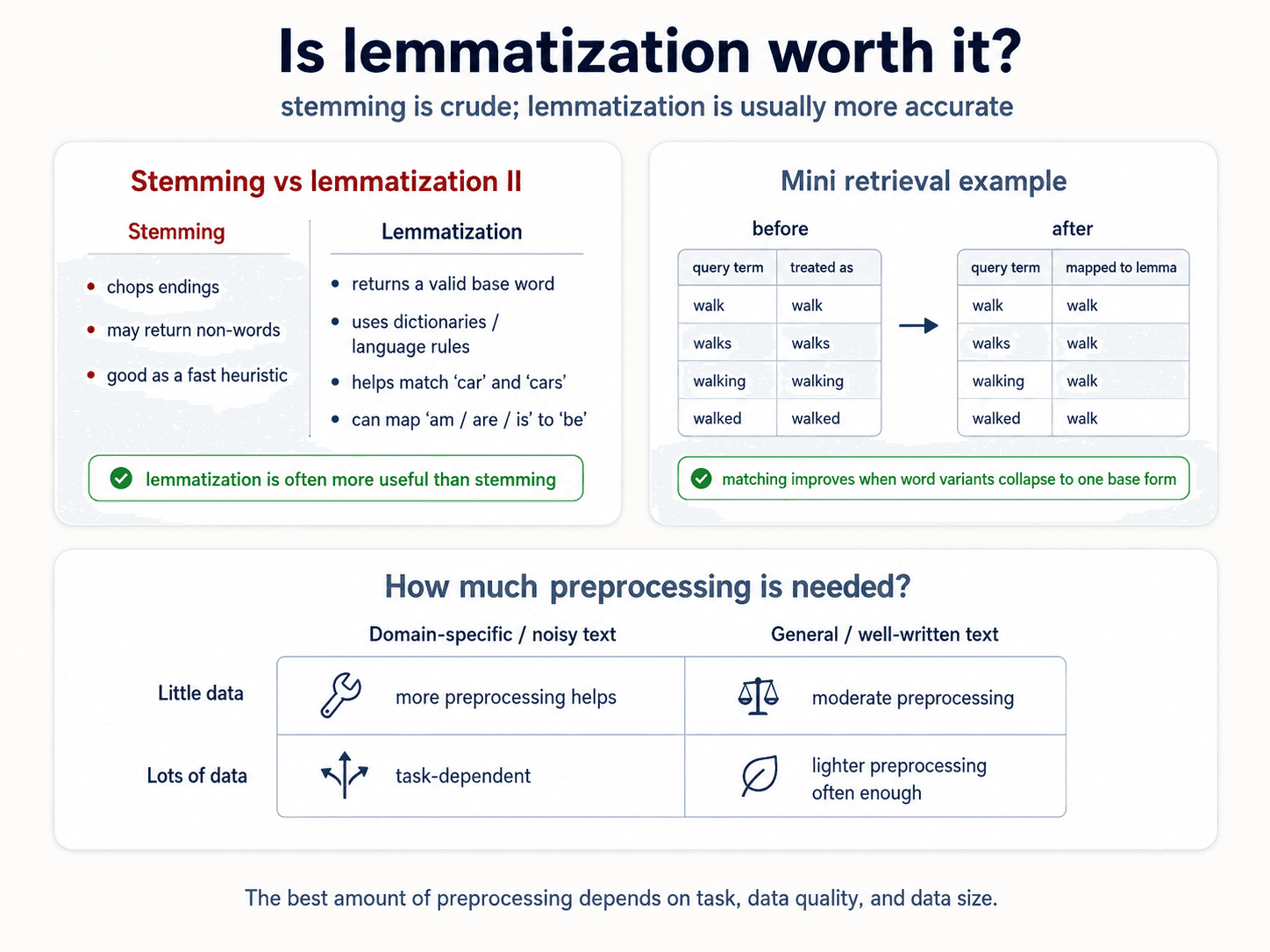
The motivation is the same as subword tokenization but cruder. Without it, walk, walks, walking each get their own column in the vector. walk ends up no closer to walking than it is to tree. We want all three to collapse to a single root.
Stemming
Crude. Chops off endings using regex-like rules. The result may not be a real word.
running → run ✓
studies → studi ✗ (not a real word)
replacement → replac ✗
Heuristic example (from the Porter stemmer): "if the word ends in SSES, replace with SS" — so BOSSES → BOSS. Then "if the word ends in IES, replace with Y" — so PONIES → PONY. There are about a hundred such rules.
from nltk.stem import PorterStemmer
ps = PorterStemmer()
ps.stem("running")  # 'run'
ps.stem("studies")  # 'studi'
Lemmatization
Looks up the lemma — the canonical form of the word — in a dictionary (typically WordNet). The result is always a real word. But it's POS-dependent: saw as a verb has lemma see; saw as a noun has lemma saw. You need to tag part-of-speech first.
from nltk.stem import WordNetLemmatizer
lem = WordNetLemmatizer()
lem.lemmatize("running", pos="v")   # 'run'
lem.lemmatize("studies", pos="v")   # 'study'
lem.lemmatize("saw", pos="n")        # 'saw'  (the tool)
lem.lemmatize("saw", pos="v")        # 'see'  (the verb)
Decision frame
| Your need | Reach for |
|---|---|
| Speed, rough grouping (search ranking, fast classification) | Stemming |
| Output has to be readable / used downstream | Lemmatization |
| Modern transformer pipeline | Neither — subword tokenization handles it |
| Multilingual without language-specific tooling | Subword tokenization |
❌ Myth: "You always need stemming or lemmatization before training." ✅ Reality: Only for classical pipelines (bag of words, TF-IDF, logistic regression on word counts). Modern transformer-based pipelines do subword tokenization which collapses morphological variants for free — you don't need stemming on top.
Putting it together — a simple text-classification workflow
You don't need everything in this post for every project. The minimum viable end-to-end pipeline is short:
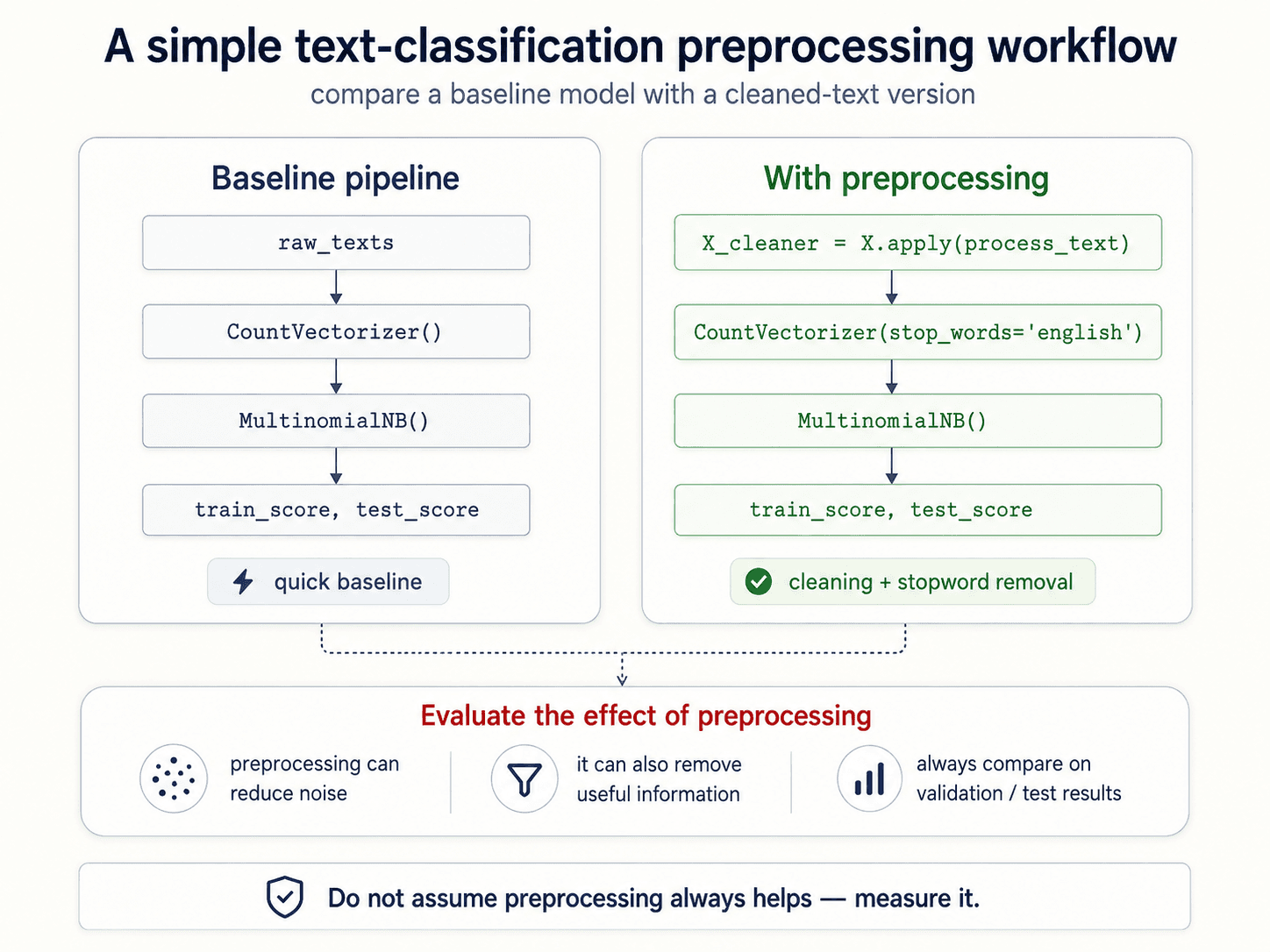
The whole point of this session: preprocessing is a decision, not a default. Every step changes what the model can see. Treat the choices as hypotheses and validate them empirically.
A quick glossary before you go
The terms you'll be reading in every NLP paper and codebase from here on:
- Token — a word (or subword, or character) after tokenization.
- Vocabulary — the set of all unique tokens in your corpus.
- Corpus — the dataset.
- Document — one unit of analysis.
- Vector — a 1D array of numbers with both magnitude and direction.
- Sparse matrix — a matrix where most cells are zero, stored efficiently in
scipy.sparse.
What's next
Bag of words + TF-IDF gets us a vector. We can compute distances. We can train a classifier. But we've still lost three things:
- Word order. Bag of words discards it. We get it back in Part 4 with sequence models.
- Context. "Bank" in "river bank" vs "investment bank" still gets one vector. We get it back in Part 5 with transformers.
- Synonyms. "Doctor" and "physician" are still separate columns. Part 3 fixes this with embeddings — vectors where semantically similar words end up close together, even when nobody told the model they were related.
See you in Part 3.