
Table of Contents
- 1. Why bother
- 2. The stack, and why each piece
- 3. How it all fits together
- 4. What I actually did, step by step
- 5. The four things that broke along the way
- 6. What the deploy workflow looks like
- 7. Hitting the endpoint
- 8. How it's doing in production
- 9. The cost
- 10. What I'd do differently next time
- 11. What this project unlocks
Last update: June 2026. All opinions are my own.
Why bother
A model in a notebook is a sketch. A model behind an HTTPS endpoint is a system someone can actually use.
Most of the data work I'd done before lived in the first category — train, evaluate, write up, close the laptop. Useful for learning, useless to anyone but me. This project was the opposite exercise: a small cloud migration. Take a model I'd already built (forest cover type prediction, the Kaggle classifier), pull every thread until it lifts off my laptop and runs as a real service on Microsoft Azure.
The model itself is the same one from the earlier post — a Random Forest on the cartographic features of the Roosevelt National Forest dataset, predicting one of seven tree cover types. The interesting part this time isn't the model. It's the system around it.
You can hit it right now:
curl https://forest-cover-endpoint.whiteflower-743727a8.northeurope.azurecontainerapps.io/health
# {"status":"ok"}
It might take 5–10 seconds the first time — the container scales to zero when nobody's using it, so a cold start spins one up. Subsequent calls are instant.
The stack, and why each piece
I wanted the cheapest, simplest path that ticked the boxes any sensible engineering team would expect to see for a deployed ML service.
- FastAPI + Pydantic for the inference service. Type-checked request/response models, automatic OpenAPI docs, fast enough that the model is the bottleneck rather than the framework.
- scikit-learn + joblib for the actual model. The same
RandomForestClassifierfrom the notebook, serialised once at training time and loaded once at container start. - Docker to freeze the runtime. Python version, libraries, model weights, all in one immutable artifact.
- GitHub Actions for CI (lint + tests on every push) and a separate Deploy workflow that trains a fresh model, builds the image, pushes it to GHCR, and rolls it onto Azure on every merge to
main. - Azure Container Apps for the host. The killer feature:
--min-replicas 0means the app scales down to nothing when idle. A portfolio endpoint that's hit twice a week costs me roughly nothing. - OIDC federated credentials instead of stored secrets. GitHub Actions exchanges a workflow token for a short-lived Azure access token. There's no long-lived secret to rotate, leak, or forget about.
How it all fits together
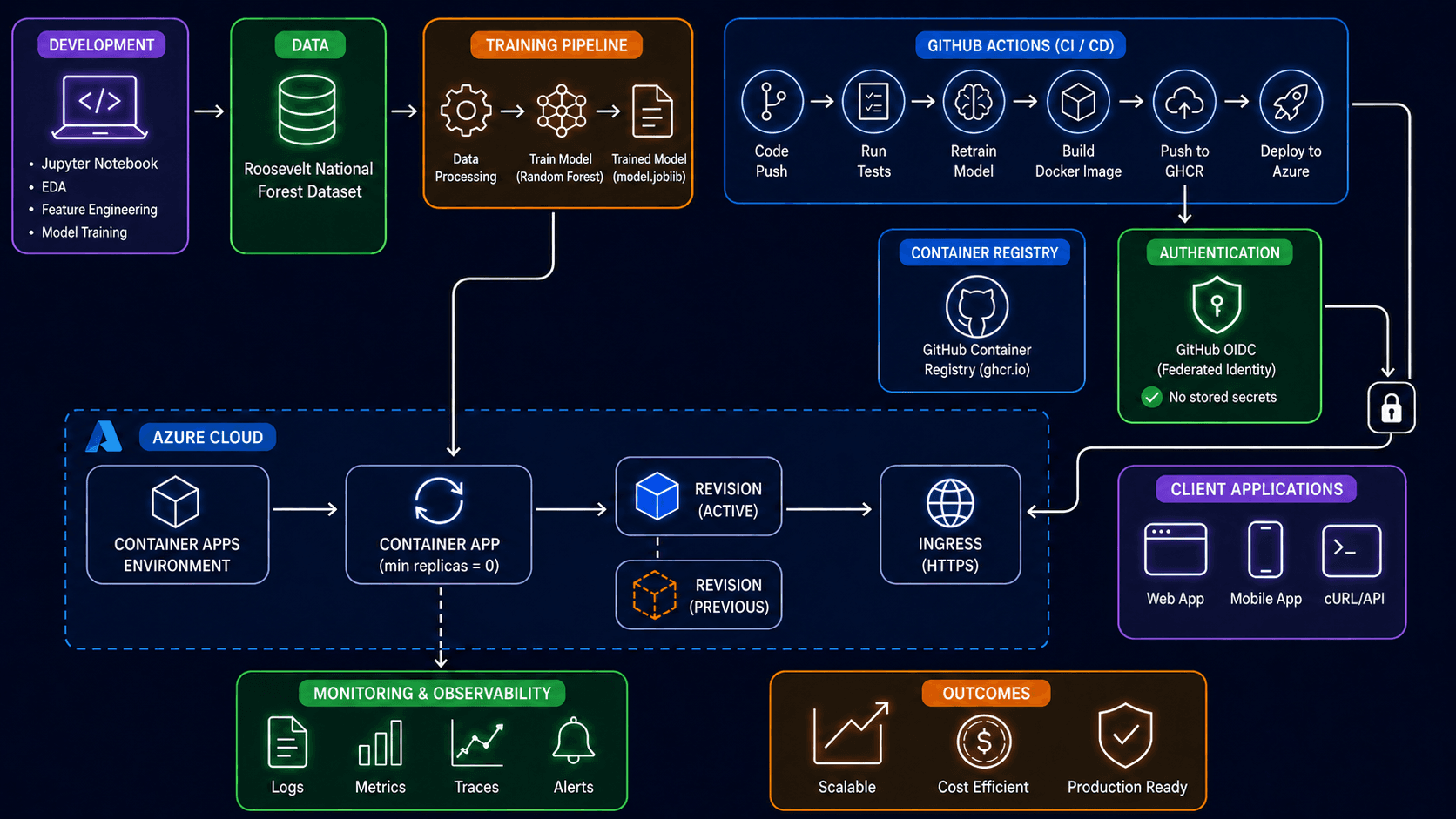
Here's the whole shape of what I built. Eleven labeled blocks, three coloured groups (development, registry/auth, cloud runtime), one outcomes panel — read left-to-right and top-to-bottom following the arrows.
Walking it block by block — what the box represents, what it actually is in this project, and what arrow connects it to the next one.
Development (purple, top-left)
- What it represents. Where the model started life — a Jupyter notebook on my laptop with exploratory analysis, feature work, and the first Random Forest fit. The three bullets (EDA, Feature Engineering, Model Training) are the three phases the notebook went through.
- In this project. The notebook is the subject of the earlier forest cover post. This post starts where that one ends — the moment the notebook produced "a model that works" and the next question became "how do I make this serve real users?"
- Arrow out. Right, into Data, because the first thing any reproducible training pipeline needs is a stable data source.
Data (green)
- What it represents. The dataset. Cylinder icon is the classic "this is a data source" glyph.
- In this project. The Roosevelt National Forest cartographic dataset from UCI — about half a million rows of terrain measurements (elevation, slope, aspect, distances to water and roads, hillshade angles, soil type, wilderness area), labelled with one of seven forest cover types. The training workflow downloads it on every run rather than vendoring a copy in the repo.
- Arrow out. Right, into Training pipeline.
Training pipeline (orange)
- What it represents. The transformation from raw rows to a serialised model. Three sub-icons, three sub-steps.
- Data Processing — the cells that used to live in the notebook for cleaning, encoding, and train/test splitting, now extracted into a function.
- Train Model (Random Forest) —
RandomForestClassifierfrom scikit-learn with 200 estimators on a 50k row sample. Hits ~87% accuracy on a held-out test set; good enough for the demo. - Trained Model (model.joblib) — the fitted classifier serialised to disk with
joblib, which is scikit-learn's recommended serialisation for ML artifacts (handles numpy arrays better than pickle).
- In this project. All of this lives in
train/train.py, parametrised by--sample-sizeand--n-estimatorsso the same script can be run for quick iteration or full training. - Arrow out. A long arrow curves down from the trained model into the Container App inside Azure Cloud. The model artifact is what every other piece of this diagram exists to serve.
GitHub Actions · CI / CD (blue, top-right)
- What it represents. The automation that takes a git push and turns it into a running service. Six sequential icons, six workflow steps.
- Code Push — the trigger. Any push to
mainstarts the pipeline. - Run Tests —
pytestagainst the FastAPI app: import smoke, schema validation,/healthround-trip,/predictreturns a valid response. If this step fails, nothing downstream runs. - Retrain Model — invokes
train/train.py, producing a freshmodel.joblibin the runner's filesystem. This is the same Training Pipeline above, only running on a GitHub-hosted Ubuntu VM instead of my laptop. - Build Docker Image —
docker buildagainst the project'sDockerfile, which copies the FastAPI app and the freshly-trained model into apython:3.11-slimbase image. - Push to GHCR — pushes the resulting image to GitHub Container Registry, tagged with the commit SHA so any version is reproducible.
- Deploy to Azure — calls
az containerapp update --image …against my Container App, telling Azure to roll to the new image tag.
- Code Push — the trigger. Any push to
- In this project. All defined in
.github/workflows/deploy.yml. - Arrows out. Two: one down into Container Registry (from the "Push to GHCR" step), and one right + down through the Authentication lock into the Container App (from the "Deploy to Azure" step).
Container Registry (blue)
- What it represents. Where the built Docker image is stored. Octocat icon = GitHub.
- In this project. GitHub Container Registry (
ghcr.io), specifically the pathghcr.io/maria-aguilera/forest-cover-endpoint:<commit-sha>. The package is public, so Azure Container Apps can pull it without a registry credential. - Arrow in. From the "Push to GHCR" step of GitHub Actions.
Authentication (green)
- What it represents. How GitHub Actions proves its identity to Azure when it tries to deploy. Shield + checkmark = "this is the trust boundary."
- In this project. GitHub OIDC (Federated Identity). Instead of storing a long-lived Azure service-principal secret in GitHub, the workflow exchanges its short-lived OIDC token for an Azure access token. Azure trusts that exchange because of a federated credential I attached to the app registration, scoped tightly to
repo:maria-aguilera/forest-cover-endpoint:ref:refs/heads/main— meaning only pushes tomainon this exact repo can mint a token. - The "No stored secrets" checkmark is literal: the only things in GitHub secrets are identifiers (client ID, tenant ID, subscription ID, RG name, container app name). Nothing that can authenticate on its own.
- Arrows. The padlock icon below the AUTHENTICATION card visually shows the trust handshake travelling from this card into the Container App in Azure — that's the link that lets the "Deploy to Azure" step actually succeed.
Azure Cloud (large dashed blue rectangle)
The trust boundary of Azure. Everything inside this rectangle is in the same Azure tenant, subscription, and resource group (forest-cover-rg).
Container Apps Environment
- What it represents. A managed Kubernetes-under-the-hood that Azure provides. You don't see Kubernetes, but it's there.
- In this project.
forest-cover-env, provisioned innortheurope(I triedwesteuropefirst; it was closed to new customers). The environment includes a Log Analytics workspace auto-attached at creation time — that's where the application logs end up. - Arrow out. Right, into Container App.
Container App (min replicas = 0)
- What it represents. The actual running service — your code in a container, exposed to the world. The circular auto-scaling icon shows it knows how to grow and shrink based on traffic.
- In this project.
forest-cover-endpoint. The--min-replicas 0flag is the cost-saving lever: when nobody's hitting the app, it scales to zero replicas and I pay nothing for compute. The first request after idle pays a 20-second cold start; subsequent requests are flat at ~170 ms. - Arrows. Receives the trained model artifact from the Training Pipeline (via the GitHub Actions Build/Push/Deploy chain). Sends a dashed line down to Monitoring & Observability because logs and metrics flow continuously to the workspace. Sends a solid line right into the active Revision.
Revision (Active) — solid blue cube
- What it represents. The currently-serving version of the container. Container Apps' answer to blue/green deployment.
- In this project. Each time GitHub Actions runs
az containerapp update --image ghcr.io/.../forest-cover-endpoint:<sha>, Azure creates a new revision tagged with that SHA and marks it active. Old revisions stick around long enough to drain in-flight requests.
Revision (Previous) — dashed orange cube
- What it represents. The previously-active revision, scaled down but not deleted. The dashed border = "exists but isn't serving traffic."
- In this project. This is the rollback lever. If a deploy goes sideways, I can flip traffic back to the previous revision with one CLI call — no rebuild, no redeploy.
Ingress (HTTPS) — globe icon
- What it represents. The public HTTPS endpoint. TLS is terminated by Container Apps; I never deal with certificates.
- In this project.
https://forest-cover-endpoint.whiteflower-743727a8.northeurope.azurecontainerapps.io. Thewhiteflower-…subdomain is randomly assigned at environment creation time and shared across all apps in the same environment. - Arrows. Receives traffic from the active revision (left) and from Client Applications (right).
Client Applications (purple, right)
- What it represents. Whatever calls the endpoint. Three icons cover the three common cases.
- Web App — a browser-based frontend.
- Mobile App — a native iOS/Android client.
- cURL / API — direct programmatic calls from a script, a backend, or my terminal.
- In this project. Right now it's
curlfrom my terminal and the GitHub Actions smoke-test step. The architecture is ready for anything else to plug in.
Monitoring & Observability (green, bottom)
- What it represents. What's needed to know the service is healthy without ssh'ing into it.
- In this project.
- Logs — structured JSON, flowing from the container's stdout into the Log Analytics workspace. Queryable by field (level, logger, message, status code) in KQL — Microsoft's Kusto Query Language.
- Metrics — the FastAPI app exposes a
/metricsendpoint in Prometheus format: request counters, latency histograms by route, in-flight request gauges, plus baseline Python process info (GC, memory). Scrapable by any Prometheus-compatible collector. - Traces — available out of the box from Container Apps but not yet wired to anything I'm reading. Honest gap.
- Alerts — an Azure Monitor metric alert on the
Requestsmetric filtered toStatusCodeCategory == 5xx, threshold of 5 errors in 5 minutes, emailing me; plus a €5/month Consumption budget alert at 80% and 100%.
Outcomes (orange, bottom-right)
The summary panel: three properties this whole setup is designed to deliver.
- Scalable. Container Apps auto-scales replicas based on concurrent HTTP requests. One replica per 10 concurrent requests by default, up to a configurable max — I capped at 2 for the demo.
- Cost Efficient. Scale-to-zero + a €5 budget alert means an idle portfolio endpoint costs essentially nothing.
- Production Ready. Federated identity (no leaked-secret risk), HTTPS-only ingress (no plaintext traffic), automated rollouts (no manual
scp-ing files), live monitoring (no flying blind), revisions for rollback (no "oh no" deploys). All the things a real production service should have, on free or near-free tier.
🔑 The only thing stored in GitHub secrets is identifiers — client ID, tenant ID, subscription ID, resource group name, container app name. Nothing that can authenticate on its own. The actual auth is a short-lived federated token, minted per workflow run.
What I actually did, step by step
Provisioning all of that is most of the project. Roughly in the order I did it:
- Built the FastAPI service.
app/main.pywith/healthand/predictendpoints, Pydantic models for the request and response so the contract is machine-checkable. Tested locally withuvicorn. - Pulled the training out of the notebook. Moved the cell-by-cell work into
train/train.py, parametrised by--sample-sizeand--n-estimators. Output:models/model.joblib. Same model, but now reproducible and runnable from CI. - Wrote the Dockerfile. Python 3.11-slim base, copy source, install the package, set the uvicorn command. (Got the COPY order wrong twice — see below.)
- Pushed the repo to GitHub. Two workflows:
ci.yml(lint + tests on every push) anddeploy.yml(train + build + push + deploy onmain). CI was green on the first commit; deploy was blocked on Azure, which I hadn't provisioned yet. - Created a fresh Microsoft account and Azure subscription. Personal account using my Gmail, deliberately separated from my IE alumni account so the tenants wouldn't tangle. Free trial signup, card on file, €5 budget alert planned.
- Logged in from the CLI.
az login --use-device-codefrom my terminal, confirmed the right subscription withaz account show. - Provisioned the cloud, all from the CLI. This is the bulk of the infra and it's all in
infra/README.md:az group createfor the resource group (had to recreate it innortheuropeafterwesteuroperejected me with "not accepting new customers").az containerapp env createfor the Container Apps environment. Slowest step — about four minutes.az containerapp createfor a placeholder container with the helloworld image and--min-replicas 0. This is what GitHub Actions will later swap onto the real image.az ad app create+az ad sp createfor the Azure AD app registration that GitHub Actions will impersonate.az role assignment createto grant the SP Contributor on the resource group only — least privilege.az ad app federated-credential createto attach a federated credential scoped to my repo'smainbranch. This is the trick that lets the workflow log in without a stored secret.gh secret setto push the five identifier-secrets to the GitHub repo (AZURE_CLIENT_ID,AZURE_TENANT_ID,AZURE_SUBSCRIPTION_ID,AZURE_RESOURCE_GROUP,AZURE_CONTAINERAPP_NAME).az rest --method putfor a €5/month Consumption budget alert at 80% and 100%, emailing me.
- Pushed an empty commit and watched it break. First deploy died on the Dockerfile layer order. Second on
.dockerignorehidingtrain/. Third onazure/CLI@v2failing to inherit the OIDC session. Fourth deploy went green end-to-end. - Hit the live endpoint.
curl https://.../healthcame back{"status":"ok"}.curl -X POST .../predictcame back with a real prediction (Lodgepole Pine, 66%) from the real trained model. That's the screenshot at the bottom of this post.
Whole thing fits in an afternoon if you don't hit the regional-capacity wall. With it, double that.
The four things that broke along the way
Most of the work was the usual provisioning. The interesting bit is what wasn't in the readme.
1. West Europe was closed for new customers
The plan was West Europe — closest, lowest latency, what every Azure tutorial defaults to. The Container Apps environment provisioning failed with:
Resource 'workspace-...' was disallowed by Azure: The selected region
is currently not accepting new customers.
The Azure free tier is capacity-rationed per region. Whole regions go "closed to new" when they fill up. The fix was a 30-second az group delete + recreate in North Europe (Ireland). Latency from Madrid is barely worse. Lesson: pick your region last, not first.
2. Dockerfile copy order vs pip install .
The package's pyproject.toml lists both app/ and train/ as setuptools packages. The original Dockerfile copied just pyproject.toml and ran pip install . before copying the source. Egg-info couldn't find the package directories and the build crashed on:
error: package directory 'app' does not existThis is the classic Dockerfile efficiency-vs-correctness tension. Best practice is to install deps before copying source, so a code change doesn't bust the dep-install layer cache. But if your install resolves the project itself (not just its deps), the source has to be present. The right fix here was to bite the cache miss — copy everything, then install.
3. .dockerignore was hiding train/ from the build context
After the copy-order fix, COPY train ./train failed with "/train": not found. The .dockerignore had train/ blacklisted — sensible if the install only needed it for, say, model artifacts. Less sensible when pip install . resolves it as a runtime package. Removed the entry. The runtime image is ~50KB bigger.
4. azure/CLI@v2 isolated the OIDC session
This one took the longest to find. The deploy workflow uses azure/login@v2 for OIDC, then originally used azure/CLI@v2 to run az containerapp update. The login step logged "Subscription is set successfully. Azure CLI login succeeds by using OIDC." — and then the next step failed with:
ERROR: The containerapp '***' does not existThe container app did exist. The federated SP did have Contributor on the resource group. The login step did succeed. So what?
azure/CLI@v2 spawns its own Docker container to run the Azure CLI. The auth state from azure/login@v2 lives on the runner's host filesystem and doesn't reliably reach the inner container. The CLI inside the container had no active session, and asking it "find this container app" returned an empty result that the error message labels as "does not exist."
The fix was to drop azure/CLI@v2 and run az directly with a plain run: step. The host runner already has the CLI and the active login from the previous step. Smaller surface, less indirection, and the moment I added an az account show line right before the update, every future debug session gets the subscription identity printed clearly in the log.
What the deploy workflow looks like
The deploy job, condensed:
jobs:
  build-and-deploy:
    runs-on: ubuntu-latest
    permissions:
      contents: read
      packages: write
      id-token: write       # OIDC
    steps:
      - uses: actions/checkout@v4
      - uses: actions/setup-python@v5
        with: { python-version: "3.11", cache: pip }

      - run: pip install -e '.[train]'
      - run: python -m train.train --sample-size 50000 --n-estimators 200

      - uses: docker/setup-buildx-action@v3
      - uses: docker/login-action@v3
        with:
          registry: ghcr.io
          username: ${{ github.actor }}
          password: ${{ secrets.GITHUB_TOKEN }}
      - uses: docker/build-push-action@v6
        with:
          push: true
          tags: |
            ghcr.io/maria-aguilera/forest-cover-endpoint:${{ github.sha }}
            ghcr.io/maria-aguilera/forest-cover-endpoint:latest

      - uses: azure/login@v2
        with:
          client-id: ${{ secrets.AZURE_CLIENT_ID }}
          tenant-id: ${{ secrets.AZURE_TENANT_ID }}
          subscription-id: ${{ secrets.AZURE_SUBSCRIPTION_ID }}

      - name: Update Container App image
        env:
          APP_NAME: ${{ secrets.AZURE_CONTAINERAPP_NAME }}
          RG: ${{ secrets.AZURE_RESOURCE_GROUP }}
          IMAGE_REF: ghcr.io/maria-aguilera/forest-cover-endpoint:${{ github.sha }}
        run: |
          az extension add --name containerapp --upgrade --only-show-errors
          az containerapp update --name "$APP_NAME" \
                                 --resource-group "$RG" \
                                 --image "$IMAGE_REF"

      - name: Smoke-test deployment
        run: |
          URL=$(az containerapp show \
            --name "$APP_NAME" --resource-group "$RG" \
            --query properties.configuration.ingress.fqdn -o tsv)
          for i in 1 2 3 4 5; do
            if curl -fsS "https://${URL}/health"; then echo OK && exit 0; fi
            sleep 10
          done
          exit 1
Hitting the endpoint
curl -X POST \
  https://forest-cover-endpoint.whiteflower-743727a8.northeurope.azurecontainerapps.io/predict \
  -H 'content-type: application/json' \
  -d '{
    "elevation": 2596,
    "aspect": 51,
    "slope": 3,
    "horizontal_distance_to_hydrology": 258,
    "vertical_distance_to_hydrology": 0,
    "horizontal_distance_to_roadways": 510,
    "hillshade_9am": 221,
    "hillshade_noon": 232,
    "hillshade_3pm": 148,
    "horizontal_distance_to_fire_points": 6279,
    "wilderness_area": "Rawah",
    "soil_type": 29
  }'
Returns something like:
{
  "cover_type": 2,
  "cover_label": "Lodgepole Pine",
  "probabilities": {
    "Spruce/Fir": 0.025,
    "Lodgepole Pine": 0.66,
    "Aspen": 0.315,
    "Ponderosa Pine": 0.0,
    "Douglas-fir": 0.0,
    "Cottonwood/Willow": 0.0,
    "Krummholz": 0.0
  },
  "model_version": "20260618-194508"
}
The model_version is the UTC timestamp of when this image was trained. Two different deploys will return different versions even if the predictions are identical — useful for debugging after a rollback.
How it's doing in production
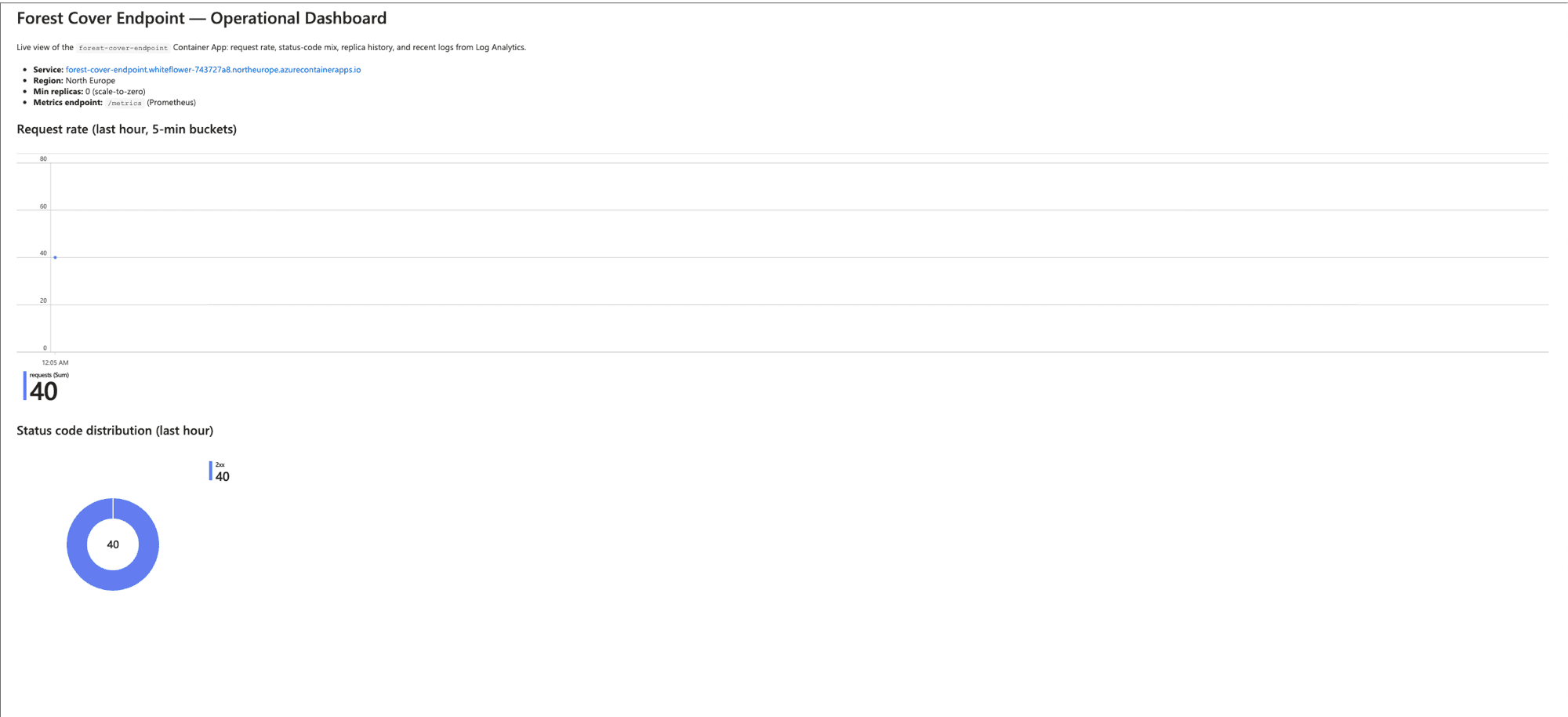
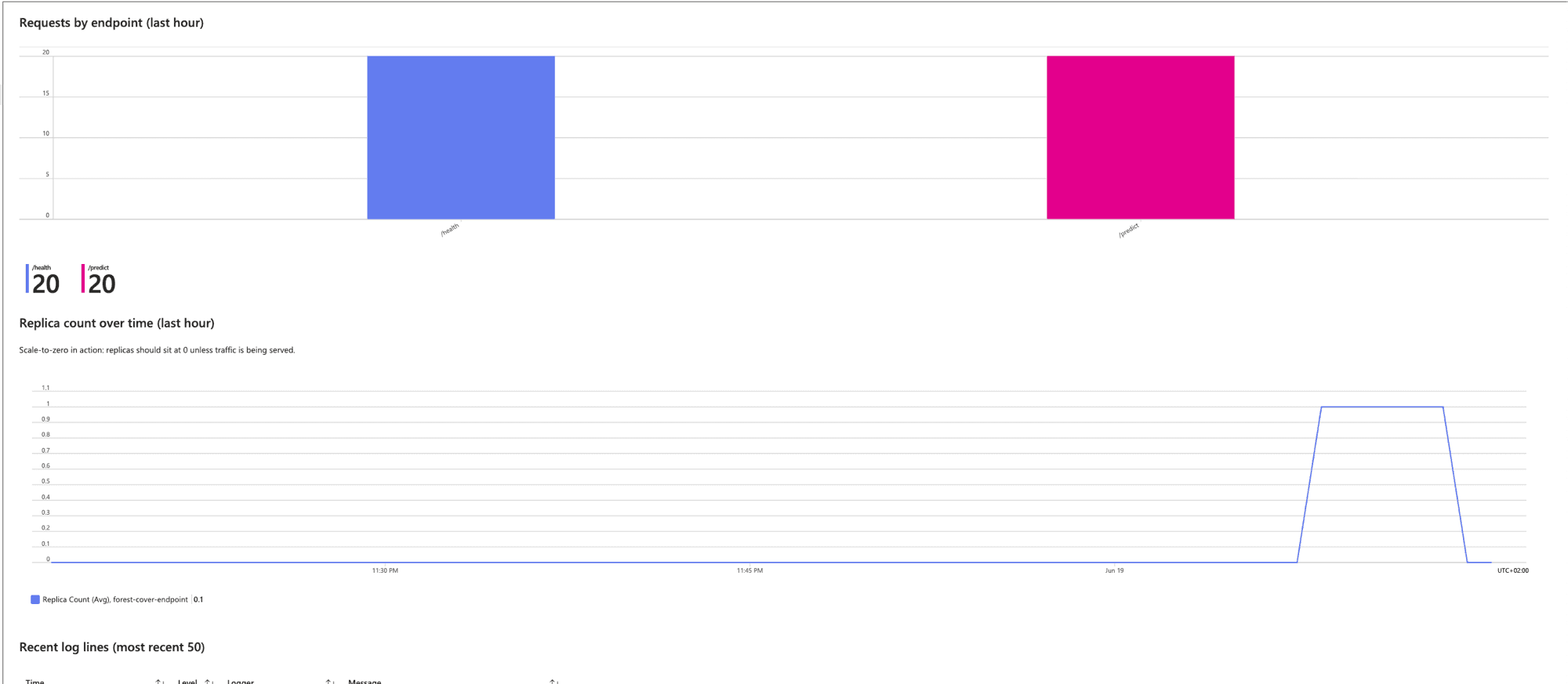
I hit the endpoint with 30 mixed requests (15 /health, 15 /predict) right after the first deploy went green, just to see what came out.
| Metric | Result |
|---|---|
| Cold-start latency (first request after scale-to-zero) | ~22s |
| Steady-state p50 latency | ~170 ms |
| Steady-state p99 latency | ~180 ms |
| Error rate | 0 / 30 |
| Replicas spun up to handle the burst | 2 |
The 22-second first request is the cost of scaling to zero — a fresh container has to start, load the joblib model, and warm uvicorn. Subsequent requests are flat around 170 ms, which is essentially the model's inference cost plus the round-trip from Madrid to North Europe.
Two replicas spun up under load because Container Apps' default scale rule is one replica per ten concurrent HTTP requests. After thirty seconds of idle, both replicas drained back to zero.
What's actually wired up on the observability side:
- Structured JSON logs into Log Analytics — queryable by level, message, route, status code.
/metricsendpoint exposing Prometheus-format counters, histograms, and in-flight request gauges.- Azure Monitor alert on the
Requestsmetric filtered toStatusCodeCategory == 5xx, threshold of 5 errors in a 5-minute window, emailing me. - Consumption budget at €5/month with notifications at 80% and 100%.
Nothing fancy, but it's the difference between "running" and "knowable while it runs."
To make this actually inspectable, I built an Azure Workbook on top of the Log Analytics workspace — six panels, all live, all backed by KQL queries I version-controlled at infra/workbook.json.
The cost
Realistic expected monthly cost: €0–2 with the container scaling to zero. Worst case if scale-to-zero hiccups: maybe €30/month. The €5 budget alert is there to catch anything weird before it becomes anything more interesting.
What I'd do differently next time
- Pin the Container Apps base image in the workflow rather than relying on
azurecontainerapps-helloworld:latestfor the placeholder. The placeholder is fine for a first deploy, butlatestis mutable, which means the "before" state in a rollback isn't reproducible. - Move training out of the deploy workflow. Right now every push retrains. That's fine while iterating, but in a real system training is its own thing, with its own cadence and its own artifact registry. The deploy workflow should just pick up the latest validated model.
- Wire
/metricsinto a real dashboard. The endpoint exists and the data is there; what's missing is a Grafana or Azure Workbooks board pointing at it. Without it, latency p99 and request rate live in scrape output that nobody's looking at.
What this project unlocks
A handful of things I can now do end-to-end that I couldn't before:
- MLOps and model deployment. Train a scikit-learn classifier, package it in Docker, and roll it out to a managed cloud service via a CI gate — without manually copying artifacts or restarting servers.
- Microsoft Azure end-to-end. Container Apps, Log Analytics, role-scoped IAM, and Consumption budgets — provisioned through the Azure CLI and version-controlled in
infra/README.md. - Cloud migration patterns. Lifting a local-only artifact into a managed cloud service with reproducible deployments and a clean rollback path.
- Secret-free CI/CD. GitHub Actions federated to an Azure AD app registration via OIDC — no long-lived credentials stored anywhere.
The non-skill thing I'm taking away: the model is the easy part. Six minutes of every deploy is spent re-fitting the classifier. The rest was getting the model to ship reliably. Most ML coursework treats the algorithm as the deliverable, which turns out to be backwards once a real user has to talk to it.
The code, including the infra/README.md walkthrough, is on GitHub:
github.com/maria-aguilera/forest-cover-endpoint.